

AI contract editor
Redline, sign, and invoice from the same page.
SponsorFlo is an AI contract editor for teams, events, and nonprofits that sell sponsorships. Draft the agreement on the deal, handle counters with tracked versions, and send it for signature. The version they sign sets the invoice schedule and the deliverables.
The demo workspace is read-only and needs no signup.
- Draft
- Done
- Redline
- Open
- Sign
- Next
Every save is a version you can restore.
The sponsor counters. The AI contract editor updates everything downstream.
Step through the versions of one title sponsorship. Watch the installment schedule update with the clause, so the contract and the invoices never disagree.
Section 2. Grant of rightsProperty grants Brand exclusive jersey-front placement for the 2026 season.
Section 4. Feestwo installments: June 1 and December 1. three installments: June 1, September 1, and December 1.
Finance prefers three. Same total fee.
Works for us. Sending for signature.
- Installment 1 of 3June 1
- Installment 2 of 3September 1
- Installment 3 of 3December 1
Works alongside your legal team, not instead of them.
Sponsorship agreements, on the deal
- Title, presenting, and hospitality deals
- Threaded comments by clause, for counsel too
- Version history to compare what changed
- Signed file next to the deck and invoices
Everything else
- Procurement and vendor contracts
- Employment agreements
- Company-wide policy and approvals
- Counsel still reviews exclusivity, indemnity, and termination
Watch SponsorFlo run a sponsorship season
See Sevens Rugby move from inventory and research through Deck Studio, agreements, deliverables, and renewals — the full seller season in one walkthrough.
From the approved deck to next season’s renewal, on one page.
A minor league team closes a jersey patch sponsorship. Here is where each piece lives.
- 1DeckThe sponsor approved a logo mockup on the jersey
- 2AgreementLocks in the fee and the number of home games
- 3SignatureSigned through a link, PDF saved on the partner page
- 4SeasonDeliverables tracked, patch photos attached as proof
- 5RenewalNext draft starts from the signed terms
Get it right before they sign.
The signed version is the one finance and ops work from all season. Five fields to lock down first.
Finalize five fields
- Legal namesBoth parties, matching how finance will invoice.
- Term datesAligned with the season or event calendar.
- Fee and installmentsMatching the package the sponsor approved in the deck.
- Deliverable exhibitEvery benefit, from the fan-fest booth to the social post series.
- Notice periodsRenewal and termination, so both sides know the timeline.
Agreed something by email? Paste the accepted language into the clause, so the signed version is the one everyone references.
What happens next
- The PDF savesOn the partner page, next to the deck and the email thread.
- The agreement goes activeOnce both sides sign, the status changes without a manual step.
- Deliverables in one clickCreate from items turns what the sponsor bought into deliverables to assign.
- Invoices line upThe signed installment schedule feeds the payments tab.
- Renewal starts readyNext season’s draft begins from these terms.
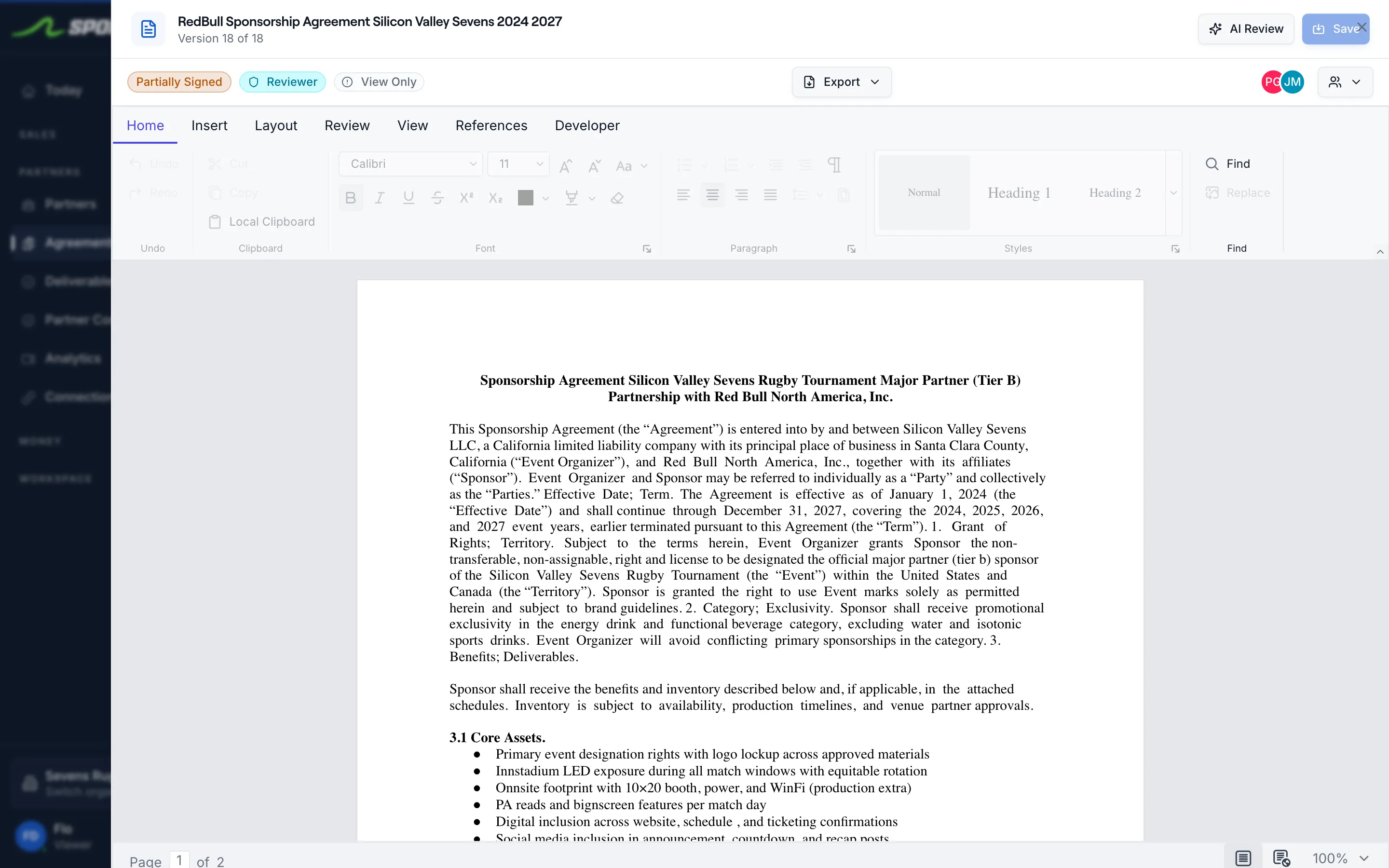
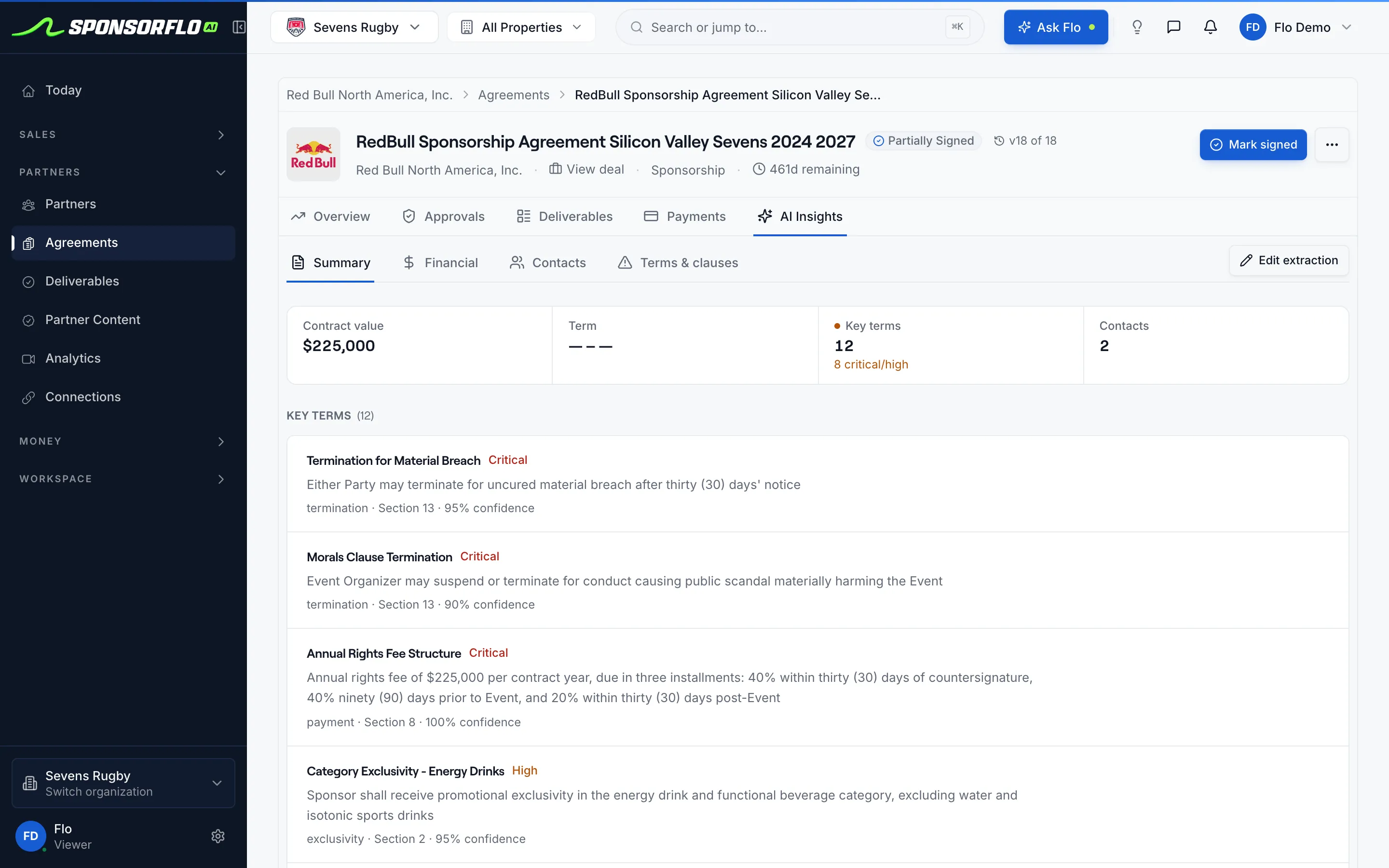
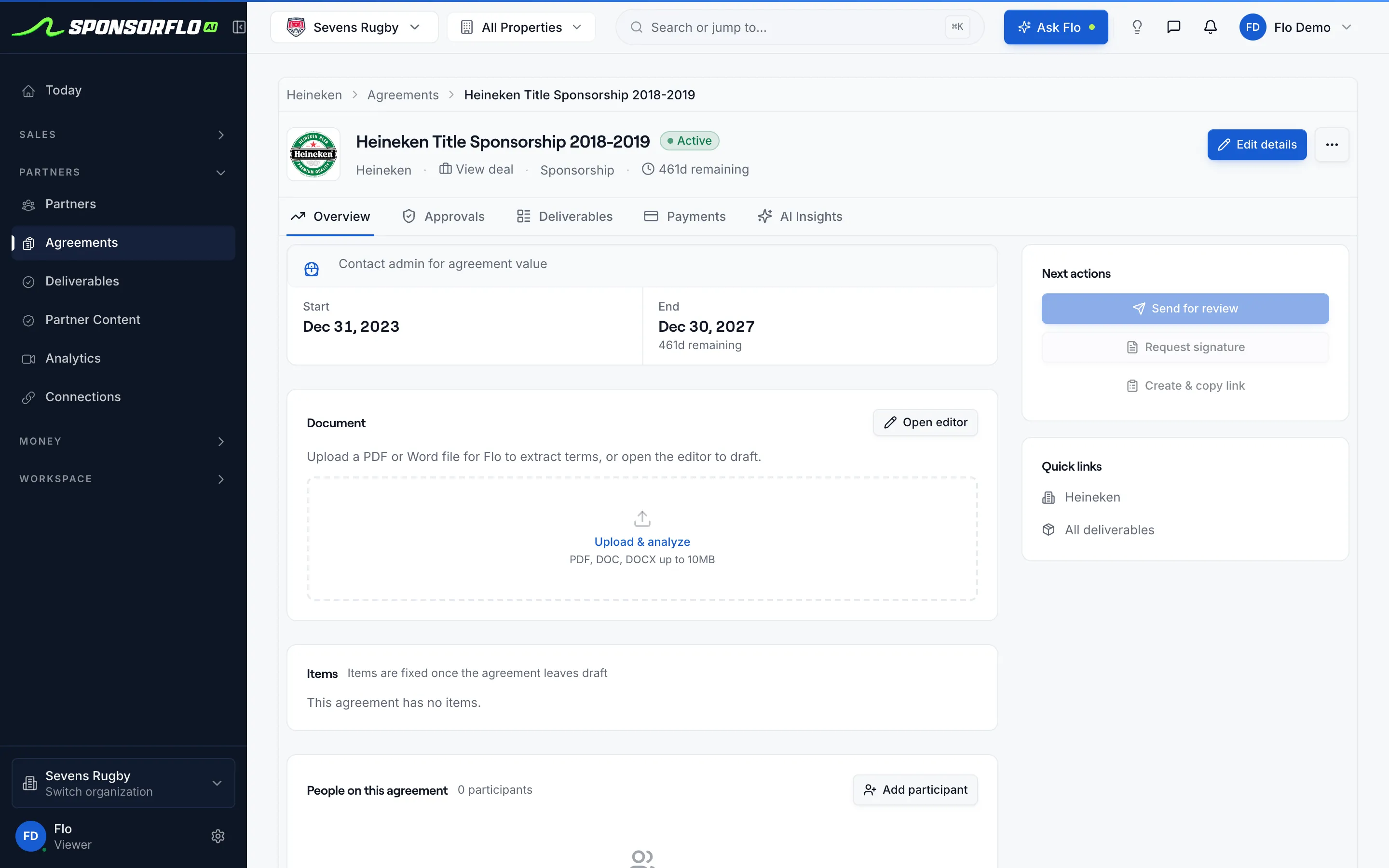
The editor and the extracted terms, on the same deal.
Screens from Sevens Rugby, our read-only property demo workspace.
Questions
Already have signed PDFs? Extract them with AI agreements.
What is an AI contract editor for sponsorships?
An AI contract editor for sponsorships is a document workspace built into the deal where you draft, redline, and sign sponsorship agreements. SponsorFlo’s editor keeps the agreement on the same partner page as the deck and the invoice, and after signature AI extracts the term, fee, and deliverables so they become trackable tasks.
What does SponsorFlo’s agreement editor include?
A clause editor for parties, term, fee, and deliverables; comments tracked by author and date; version history you can roll back; request-signature workflow; and AI extraction that reads the signed PDF into structured fields you review. Everything lives on the partner page alongside the deck.
How do you redline a sponsorship contract?
Edit the clause directly in the editor when the sponsor counters. Comments stay threaded on that section, and every save is a version you can restore.
Does the sponsor need an account to sign?
No. You request a signature from the partner page, the sponsor signs through a link, and the executed PDF saves on the partner page automatically.
What happens after the sponsor signs?
The signed PDF saves to the agreement and it becomes active. Create from items on the Deliverables tab turns what the sponsor bought into deliverables your team assigns and tracks. For a contract signed outside SponsorFlo, upload the PDF instead: AI extracts the deliverables and payment schedule, and you review them on the draft agreement.
Can I use it alongside my legal team’s tools?
Yes. SponsorFlo handles sponsorship agreements on the deal. A company-wide contract lifecycle tool can keep handling procurement and employment agreements.
Does SponsorFlo provide legal advice?
No. The editor gives you structured fields for drafting and tracking sponsorship agreements. Counsel should still review exclusivity, indemnity, and termination language according to your organization’s policy.
AI contract editor
A document workspace on the sponsorship deal that uses AI to help you draft, redline, and manage agreements. In SponsorFlo, the editor lives on the partner page alongside the deck and the invoice, and after signature AI extracts terms and deliverables from the signed PDF.
Read the full guide to the AI contract editor
AI contract editor: how to draft, redline, and sign sponsorship agreements in one place
An AI contract editor for sponsorships keeps the agreement on the same record as the deck and the invoice, so your team drafts, redlines, and sends for signature without switching tools. SponsorFlo’s agreement editor is built for teams, events, and nonprofits that sell sponsorships. You write or paste clauses, track comments by author and date, restore earlier versions, and request a signature, all on the partner page. After the sponsor signs, AI extracts the term, fee, and deliverables into structured fields you review, turning a PDF into trackable tasks instead of an attachment buried in email.
What is an AI contract editor for sponsorships?
An AI contract editor for sponsorships is a document workspace built into the deal record where you write the agreement, handle counters, and collect a signature. It replaces the cycle of emailing Word files back and forth by keeping every draft, comment, and version in one place. SponsorFlo’s editor stores the agreement on the same partner page as the proposal deck the sponsor already approved, so the contract and the pitch share a single source of truth.
What does SponsorFlo’s agreement editor include?
The editor includes everything a sponsorship team needs to move from a handshake to an executed contract. Each feature is designed for the way sponsorship deals close: packages first, then paperwork, then fulfillment.
- Clause editor for parties, term, fee, and deliverables, which you draft or paste from a template.
- Comments tracked by author and date, threaded on the specific clause so feedback stays in context.
- Version history that lets you compare any two drafts and roll back if a redline accidentally removes a deliverable table.
- Request-signature workflow so the sponsor signs without creating a new login.
- AI extraction that reads the signed PDF and writes the term, fee, and deliverable lines onto the deal as structured fields you review.
How do you redline a sponsorship contract with AI?
When the sponsor sends back a counter, you edit the clause directly in the SponsorFlo editor rather than opening a separate Word file. Comments stay threaded on the section where the change happened, so you can see who asked for the change and when. Every save creates a new version with its author and a summary of what changed. If a redline accidentally deletes the hospitality exhibit, you roll back with one click instead of hunting through email attachments.
For example, if a sponsor wants to split the fee into three installments instead of two, you update the installment table in the editor, leave a comment noting the change, and the version history records both the original and the revised schedule. The payments tab later uses whatever schedule the signed version contains.
How does the signature workflow work?
Once both sides agree on the language, you request a signature from the same partner page. The sponsor receives a link, reviews the final document, and signs without creating a new account. The executed PDF saves on the partner page automatically, next to the deck, the proposal history, and the communications from your connected inbox.
- Finalize the agreement in the editor on the partner page.
- Click request signature and choose the signer on the sponsor side.
- The sponsor reviews and signs through a link.
- The executed PDF saves on the partner page, visible to your whole team.
What happens after the sponsor signs?
After signature, the signed PDF stays on the partner page as the version finance and operations reference all season, and the agreement becomes active. Create from items on the Deliverables tab turns what the sponsor bought into deliverables your team assigns and tracks. For a contract signed outside SponsorFlo, upload the PDF instead: AI extracts the term, fee, deliverables, and payment schedule, you confirm the sponsor and the deal, and each extracted line lands on a draft agreement for you to check.
How does the AI contract editor connect to the rest of the deal?
The agreement editor is one part of the partner page in SponsorFlo. The deck the sponsor approved during the pitch, the email threads from your connected Gmail or Outlook inbox, the deliverables your team fulfills during the season, and the invoices you collect through the payments tab all live on the same record. When it is time to renew, last season’s signed agreement is still there, so the new draft starts from the terms both sides already agreed to rather than a blank page.
Consider a minor league team closing a jersey patch sponsorship. The deck showed the sponsor a logo mockup on the jersey, the agreement locks in the fee and the number of games, the deliverable tracks whether the patch ran at every home game, and proof-of-performance photos attach to each deliverable. At renewal, the team pulls up the partner page and shows the sponsor exactly what was promised, what was delivered, and what the next season should look like.
Using the AI contract editor for renewals
Renewals go faster when the previous agreement is easy to find. In SponsorFlo, last season’s signed PDF is on the partner page, so you start the new draft from the existing terms instead of searching through email or a shared drive. Update the fee, adjust deliverables based on what the sponsor valued most, and send the renewal for signature from the same workspace. The version history keeps both the original and the renewal, giving you a clean audit trail across seasons.
When should you use SponsorFlo’s editor versus an external tool?
Use the SponsorFlo editor when the agreement is a sponsorship deal and you want the signed file on the same record as the deck and invoice. If your legal team runs a dedicated contract lifecycle tool for company-wide policy across departments, both can coexist. SponsorFlo handles the sponsorship contract on the deal; your enterprise CLM handles procurement and employment agreements. Counsel should still review exclusivity, indemnity, and termination clauses according to your organization’s policy.
Fields to finalize before requesting a signature
- Legal names for both parties that match how finance will invoice.
- Term dates that align with the season or event calendar.
- Fee totals and installment schedule that match the package the sponsor approved in the deck.
- Deliverable exhibit that lists every benefit: a booth at the fan fest, a logo on the video board, a social media post series.
- Renewal and termination notice periods so both sides know the timeline.
If the sponsor negotiates part of the deal by email, paste the accepted language into the editor clause so the signed version is the one your team references all season, not a thread nobody can find at renewal.
- AI agreement intelligence — upload a signed PDF and let AI extract terms and deliverables
- Payment collection — invoice sponsors from the fee schedule in the signed agreement
- Contract templates — starter clauses and checklists for sponsorship agreements
Related features
AI agreement intelligence
Upload a signed PDF and let AI extract terms and deliverables
Learn moreFeaturePayment collection
Invoice sponsors from the fee schedule in the signed agreement
Learn moreResourceContract templates
Starter clauses and checklists for sponsorship agreements
Learn moreFeatureAI deck builder
Build the branded sponsorship deck that leads to the contract
Learn moreRetire the Word-file email chain.
Open a demo agreement to see the editor, version history, and extracted terms on a real partner page.