AI sponsorship email

Follow-ups that know what they opened.

SponsorFlo is AI sponsorship email software for teams, events, and nonprofits that sell sponsorships. It drafts each email from the deal: the deck you sent, whether they opened it, the package on the table, and your last conversation. You edit it and send from your own Gmail or Outlook.

The demo workspace is read-only and needs no signup.

app.sponsorflo.ai
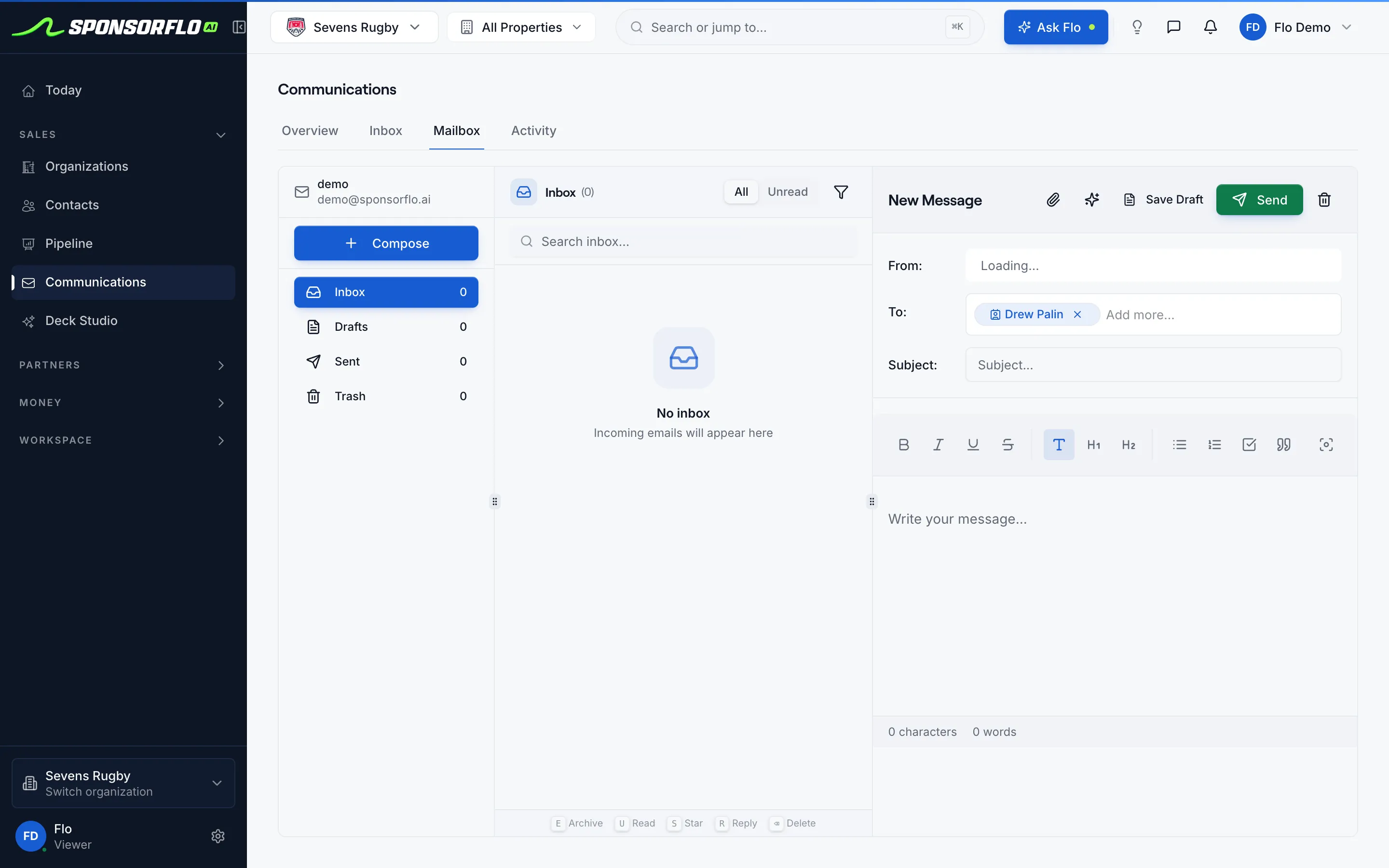
SponsorFlo email compose screen for Sevens Rugby with the Gatorade contact in the To field and a draft editor ready to send from the connected inbox.
Jordan HalePartnerships, Pacific Athletic
Deck
Sent Tue
Last note
Jersey
Send from
Gmail

Draft from the contact. Send from your connected inbox.

For sponsorship sellers at teams, events, venues, and nonprofits, and for brands reaching out to properties about renewals.

Same deal, five different AI sponsorship emails.

Pick where the conversation stands. The draft uses only the context that matters for that moment. Hover a detail on the left to see where it shows up.

On this deal

First outreach

To jordan.hale@pacificathletic.com
Subject Your jersey drop and our home kit

Hi Jordan,

Congrats on the new jersey line. Our home jersey program could put Pacific Athletic in front of our fans the week it hits stores.

I put together a short deck on what a title partnership would look like. Open to a quick look next week?

Jeff

Drafted from the deal. You edit before anything sends.Send from your connected inbox

Three emails, each with something new to say.

A first note, one follow-up, and a close-the-loop if the first two go unanswered. That is the whole cadence.

Email 1

First note

Opens with something specific about their business, from your research.

Email 2

Follow-up

Adds information: when the deck went out, whether they opened it, and what is on which slide.

Email 3, if needed

Close the loop

Acknowledges the silence and offers a smaller package or a clean exit.

Sponsors are partnership managers, not leads in a drip campaign. Nothing sends on autopilot.

Watch SponsorFlo run a sponsorship season

See Sevens Rugby move from inventory and research through Deck Studio, agreements, deliverables, and renewals — the full seller season in one walkthrough.

What a good draft includes, and when to start from a template.

Templates give you the structure. AI drafts fill in the deal details a template cannot see.

Before you send

What a good draft includes

  • The specific packageA jersey patch or a podcast read, not “partnership opportunities.”
  • When the deck went outAnd whether they opened it.
  • Something about themA research talking point tied to their business.
  • One clear next stepA meeting, a revised mockup, or a signature.
  • Real numbersThe package value, so interest turns into a conversation.
Templates or AI drafts?

Structure, then the details

  • Templates give you the structureFree starting copy for first notes, follow-ups, and proposal covers. Works in any email client.
  • AI drafts fill it inThe actual proposal, package, and last conversation, which a template cannot see.
  • New to the team?Start with templates to learn the voice, then switch to drafts once deals are in SponsorFlo.

Get the email templates

Where drafting lives in SponsorFlo.

Screens from Sevens Rugby, our read-only property demo workspace.

app.sponsorflo.ai
SponsorFlo email compose screen for Sevens Rugby with the Gatorade contact in the To field and a draft editor ready to send from the connected inbox.
Compose: draft from the contact on the deal, send from your connected inbox.
app.sponsorflo.ai
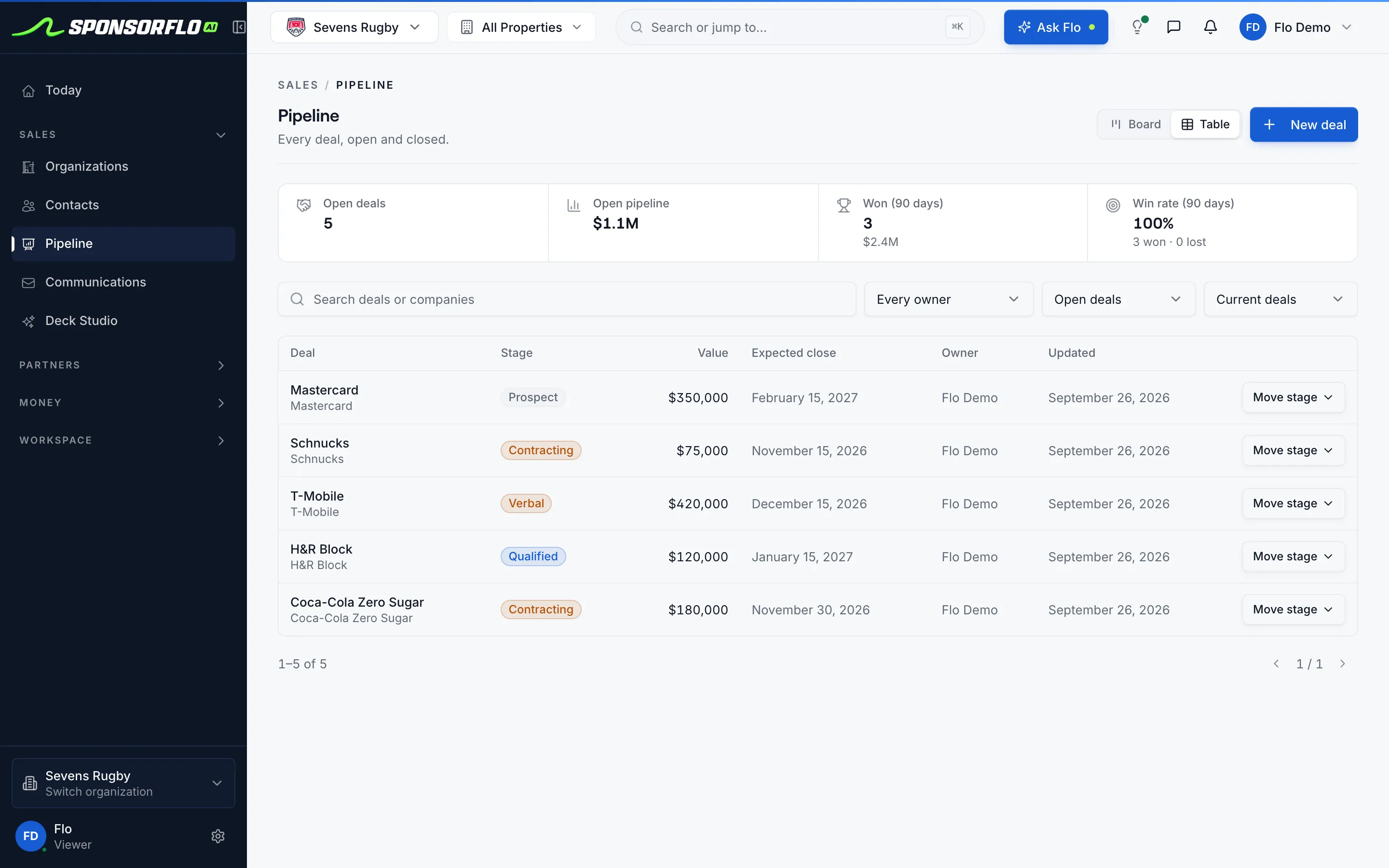
SponsorFlo pipeline table for Sevens Rugby listing open sponsorship deals with stage, value, expected close date, and owner.
Pipeline: every open deal with stage, value, close date, and owner.

Sent from your inbox. Replies land on the deal.

Sponsors see your address, not a platform’s, and reply to the mailbox they already know.

  1. DraftWritten from the contact’s deal record
  2. EditYou decide the tone, facts, and ask
  3. SendFrom your connected Gmail or Outlook
  4. ReplyThreads on the contact automatically
  5. ReviewActive and quiet threads show in analytics

No inbox connected yet? Copy the draft into any email client and log the send on the deal, so the next follow-up keeps its context.

Questions

Want to see who opened what? See sponsorship analytics.

What is AI sponsorship email outreach?

AI sponsorship email outreach uses artificial intelligence to draft a first-pass email from a contact’s deal history: the proposal they received, whether they opened it, the package value, and the last meeting or note you logged. You edit the draft and send it from your connected Gmail or Outlook account, so the sponsor sees your address and replies land in your inbox.

What context does the AI draft use?

The draft pulls the contact’s name and company, the last deck sent from the deal, whether the sponsor opened it, the package and its value, and the most recent note or meeting on the contact record. If you connected Gmail or Outlook, SponsorFlo also threads prior replies so the AI has conversation history.

Does the email send from a SponsorFlo address?

No. You connect your Gmail or Outlook account and send from that address. Replies come back to the same mailbox and appear on the contact record in SponsorFlo. If the inbox is not connected, you can still copy the draft and paste it into your email client.

What types of sponsorship emails can the AI draft?

First outreach to a new prospect, follow-up after sending a proposal, a close-the-loop note when a prospect has gone quiet, a thank-you after a meeting, and a cover note to accompany a new or revised deck.

How many follow-ups does the AI suggest?

A first note, one follow-up, and a close-the-loop if the first two go unanswered. The goal is a useful cadence that respects the sponsor’s time, not an automated sequence that sends on autopilot.

Can I use the email templates without SponsorFlo?

Yes. The sponsorship email templates resource provides starting copy you can use in any email client. The in-product AI draft adds deal context like the specific proposal, package, and meeting history that a standalone template cannot see.

How do replies get back into SponsorFlo?

When your Gmail or Outlook inbox is connected, replies are threaded on the contact record automatically. Your team can see the full conversation history during pipeline reviews without switching between apps.

AI sponsorship email

A sponsorship email drafted by artificial intelligence from a contact’s deal record: the proposal sent, the package value, the last meeting, and whether the prospect opened the deck. The sender edits the draft and sends from a connected Gmail or Outlook account, so replies thread in their own inbox and on the contact record in SponsorFlo.

Read the full guide to AI sponsorship email outreach

AI sponsorship email: how to draft outreach, follow-ups, and renewal emails from your deal history

AI sponsorship email outreach lets you draft personalized sponsorship emails from the context your team already tracks: the contact, the proposal they received, whether they opened it, and the last meeting or note you logged. SponsorFlo writes the first pass, you edit the tone and facts, and you send from your connected Gmail or Outlook so the sponsor sees your address and replies land in your inbox. The result is faster outreach that sounds like you wrote every word, because every word starts from real deal history instead of a blank template.

What is AI sponsorship email outreach?

AI sponsorship email outreach uses artificial intelligence to turn deal context into a ready-to-send email. Instead of starting from a blank compose window or a generic template with merge fields, the AI reads the contact’s name and company, the last deck that left the deal, whether the sponsor viewed it, the package value, and the most recent note or calendar entry. It produces a draft that references those specifics, so the email reads like a note from someone who knows the deal rather than a mass send. For example, after sending a booth-and-signage package to a regional bank on Tuesday, the AI might draft a follow-up that mentions the bank by name, notes that the deck was opened on Wednesday, and asks whether they would like to discuss the in-venue signage placement before the season opener.

What context does the AI use to draft a sponsorship email?

The draft pulls from five pieces of information already on the contact record in SponsorFlo, so you do not need to type background into a prompt.

  • Contact details: the recipient’s name, title, and company from the contact record.
  • Last proposal: the deck that was sent from the deal, including which pages were viewed if the sponsor opened the tracked link.
  • Package and value: the specific sponsorship package and its asking price on the current deal, so the email is not vague about what you are offering.
  • Meeting or note history: the most recent calendar note or logged conversation, which gives the AI a reference point for what was discussed.
  • Inbox thread: if Gmail or Outlook is connected, prior replies are threaded on the contact so the AI can see where the conversation left off.

How do you send AI-drafted sponsorship emails?

You send from your own connected Gmail or Outlook account, not from a SponsorFlo address. The workflow has four steps.

  1. Open the contact record in SponsorFlo. The deal context, last deck, and meeting history are already visible.
  2. Generate the AI draft. SponsorFlo writes a first pass referencing the specific proposal, package, and conversation history.
  3. Edit the tone, facts, and call to action. The AI provides a starting point; you decide what stays.
  4. Send from your connected Gmail or Outlook. The thread lives in that mailbox, and replies appear both in your inbox and on the contact record in SponsorFlo.

If you have not connected an inbox, you can still copy the draft and paste it into your email client. Logging the send on the deal keeps the next follow-up in context.

What types of sponsorship emails can AI draft?

The AI adapts the draft to where the deal stands. Five common types cover most sponsorship conversations.

  • First outreach: introduces your team or event and ties the opening line to the prospect’s brand. For instance, a minor-league baseball team pitching a local brewery might reference the brewery’s recent taproom expansion and suggest a beer-garden activation at the ballpark.
  • Follow-up after sending a proposal: the draft mentions the day the deck was sent, whether the sponsor opened it, and the specific package, so the email adds information rather than repeating a generic check-in.
  • Close-the-loop: after one follow-up goes unanswered, the AI drafts a final note that acknowledges silence and offers either a revised package or a polite close.
  • Thank-you after a meeting: references the calendar note on the contact, the topics discussed, and the next step you agreed on.
  • Proposal cover note: accompanies a new or revised deck with a short summary of what changed and why.

How many follow-ups should you send to a sponsor?

A first note, one follow-up, and a close-the-loop if the first two go unanswered is a practical cadence for most sponsorship conversations. Each message should add new information: the follow-up references whether the deck was opened, and the close-the-loop offers a revised package or a clear exit. Sponsors are busy partnership managers, not leads in a drip campaign, and the goal is a conversation, not a sequence that sends on autopilot.

How do replies get back into SponsorFlo?

When your Gmail or Outlook inbox is connected, replies are threaded on the contact record automatically. Your team can open a contact and read the full conversation history, the proposals sent, the follow-ups, and the sponsor’s responses, without switching to a separate email client. That history also feeds the analytics dashboard, so a pipeline review can show which deals have active email threads and which have gone quiet.

Using AI emails alongside sponsorship email templates

SponsorFlo’s email templates resource provides starting copy for first notes, follow-ups, and proposal covers that anyone can use, even without a SponsorFlo account. The AI draft goes further by reading the actual deal: the specific proposal, the package value, and the last conversation. Think of templates as the structure and AI drafts as the structure filled in with real details. A partnership manager who is new to the team can start with templates to learn the voice, then switch to AI drafts once contacts and deals are in the system.

What makes a good AI-drafted sponsorship email?

The best drafts reference specific deal details that prove the sender has done the work. A few elements consistently make the difference.

  • The property name and the specific package on the deal, such as a jersey-patch sponsorship or a podcast-read package.
  • The date the proposal was sent and whether the sponsor opened it.
  • A talking point from research that connects the sponsor’s business to the opportunity.
  • A clear next step: a meeting, a revised mockup, or a request for signature.
  • The package value, so the conversation is grounded in real numbers rather than vague interest.

Who is AI sponsorship email outreach for?

Sponsorship sellers at teams, events, venues, and nonprofits who already manage contacts and deals in SponsorFlo and want to spend less time writing first drafts. The AI handles the blank-page problem; you handle the relationship. Brands that buy sponsorships can also use AI drafts to reach out to properties about renewals or new opportunities, since the same deal context powers the draft from either side of the table.


Never write “just checking in” again.

Open a live contact in the demo workspace and see the draft it writes from the deal.

DeckList Sponsorship