

YouTube sponsorship software
The deck is the rate card. The published cut is the proof.
Package dedicated videos, host-reads, mid-rolls, and series with views you actually report. Show the mark on your set, sign it, and attach each published cut to the line it proves. If a video misses, the makegood goes on the same row.
Example series for illustration. The demo workspace needs no signup.
- Guarantee
- Views you report from YouTube Analytics
- If it misses
- Shortfall and makegood on the same row
- Proof
- published cutYouTube URL
How do you get sponsored on YouTube?
Brands sponsor YouTube channels, and YouTube itself does not pay you to be sponsored. To get a YouTube sponsorship, show the views you actually get, price two or three integrations from them, and pitch brands whose customers already watch your channel. A direct deal has no subscriber minimum.
Know who pays, and that there is no subscriber minimum
Brands sponsor YouTube channels; YouTube does not. A brand can sponsor a channel of any size directly. YouTube’s own Creator Partnerships tab in YouTube Studio, where brands search for channels, requires the YouTube Partner Program: 1,000 subscribers plus 4,000 watch hours in 12 months or 10 million Shorts views in 90 days, per YouTube Help on October 6, 2026.
Pull numbers you can prove
Take average views per video over the last 90 days, top countries, and age range from YouTube Analytics. Brands pay for the views a video gets, so lead with those rather than a subscriber count.
Price each integration from your views
Price a host-read mid-roll as your CPM ÷ 1,000 × your average views per video. Set the CPM from what similar channels in your niche charge, then price a dedicated video above it and an end-screen mention below it.
Package it as a rate card deck
Offer two or three integrations, each with a price, length, placement, usage rights, and whether the brand approves the cut. Put them in one deck with your audience and a still of the brand’s logo on your set; Deck Studio builds it from the packages you enter.
Pitch brands your viewers already buy
Start with products your audience asks about in the comments and brands that already sponsor creators in your niche. Send a short email that names the integration, how many videos, the month, and the price, with your rate card linked.
Disclose it and prove it ran
Turn on YouTube’s paid promotion setting, which adds a disclosure label at the start of the video, and say it on camera. Then attach the published cut to the deal as proof.
Ready to pitch? Copy the YouTube sponsorship email or price a mid-roll with the CPM calculator.
A workspace for inventory you sell.
YouTube Analytics, paid-promotion disclosure, and your CRM stay where they are.
The deal you run
- Rate card decks with set mockups
- Each integration as a deliverable
- Published cuts as proof
- Makegoods on the same record
What you keep
- YouTube Analytics for the views you report
- Paid-promotion disclosure, which is the creator's obligation
- Your CRM for non-sponsorship contacts
US paid integrations need clear disclosure: YouTube's paid-promotion toggle plus spoken or on-screen language. SponsorFlo stores the cut.
Watch SponsorFlo run a sponsorship season
See Sevens Rugby move from inventory and research through Deck Studio, agreements, deliverables, and renewals — the full seller season in one walkthrough.
Four questions the deck has to answer.
Who you reach, what they get, what it costs, and what happens next.
What the brand needs to approve
- Who you reachViews you report from YouTube Analytics, not a guessed CPM total.
- What they getLength, placement, usage rights, and whether they approve the cut.
- What it costsA price per package, not a vague exposure line.
- What happens nextSign, publish, attach the cut, and write a makegood if the video misses.
Five ways to package an integration.
Each one is a contracted line: length, placement, usage rights, and whether the brand approves the cut.
Dedicated video
The episode is the ad. Highest price when the audience fits the brand.
Host-read mid-roll
Sixty to ninety seconds inside a video they already watch.
In-scene integration
The mark appears in the content itself, not only the read.
Series or season
A flight of episodes with the same deliverable each week.
Community or end screen
Cheaper, and still a contracted line with proof.
Networks
One rate card per channel, or an umbrella deck with show appendices. Keep views per show.
Price off views you report from YouTube Analytics, not a guessed CPM total. If a cut under-delivers, name the shortfall and agree the makegood on the same record.
When a video misses the guarantee.
Another mid-roll, an end card, or a credit stays on the same deliverable, so the miss is not the story at renewal.
Sell audio too? See podcast sponsorshipWhat it looks like in SponsorFlo.
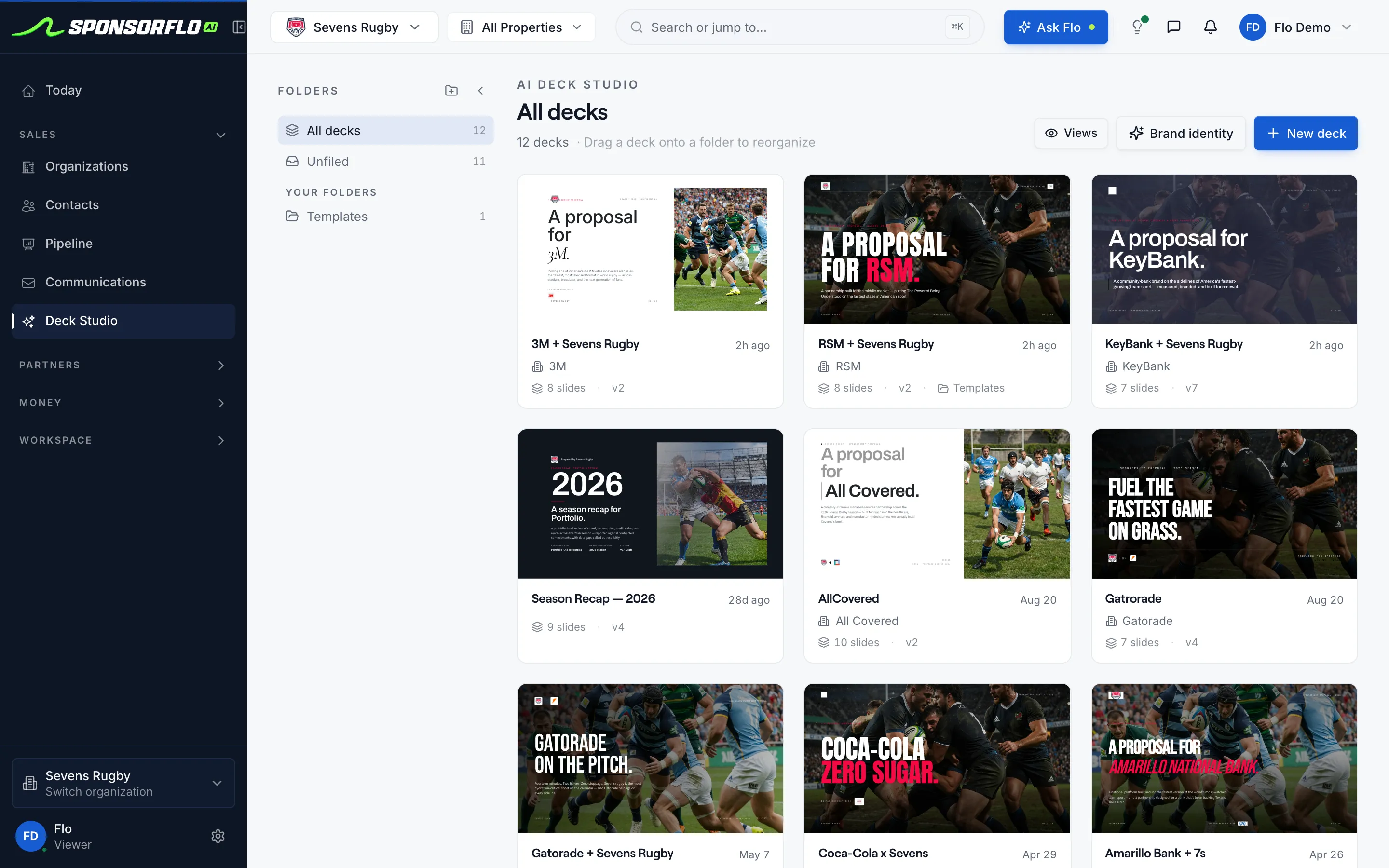
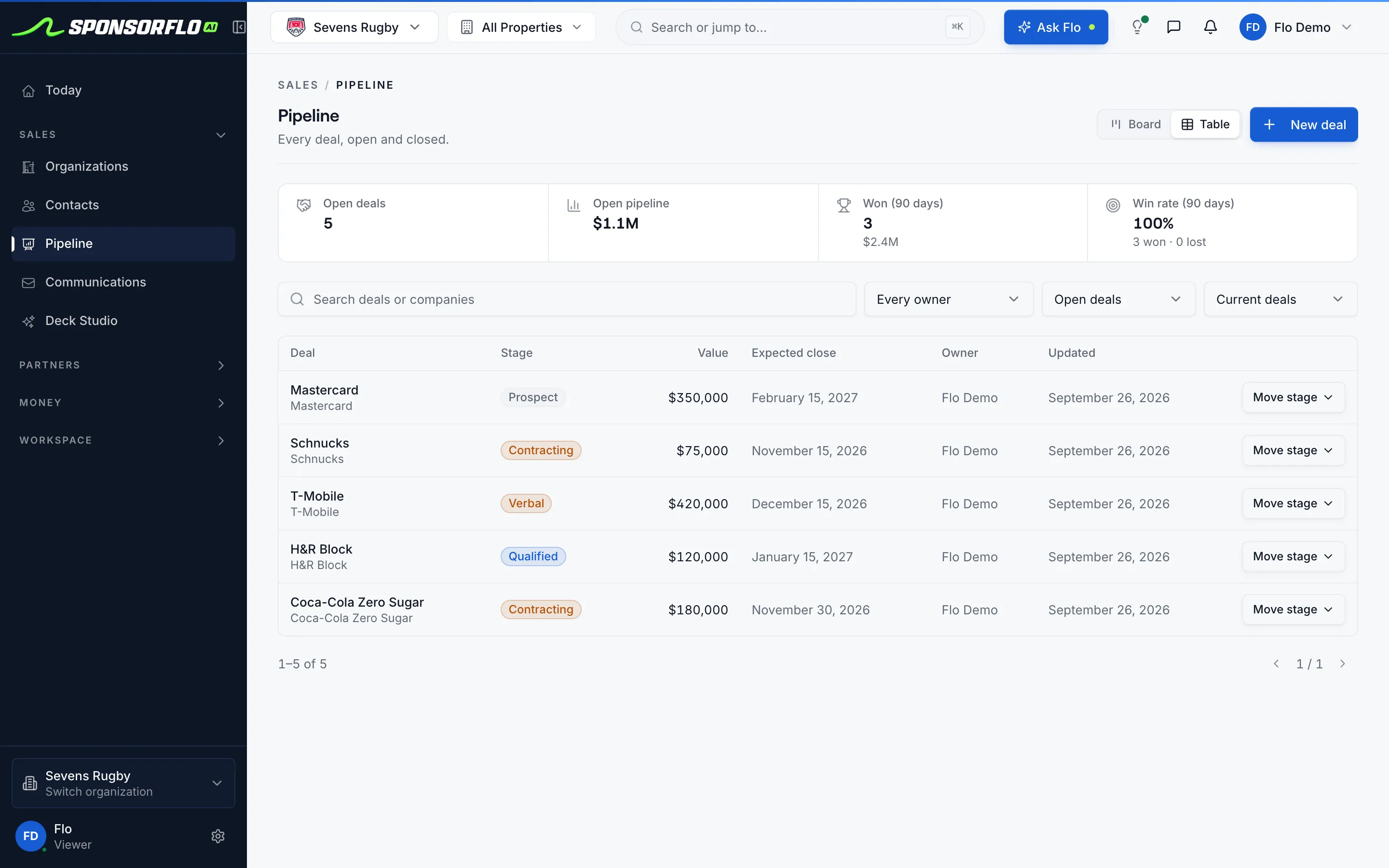
Screens from our read-only demo workspace.
Questions
Sell audio too? See podcast sponsorship.
What is YouTube sponsorship software?
YouTube sponsorship software is what channels and networks use to package dedicated videos, host-reads, and integrations with audience they report, build decks with set mockups, and attach published cuts as proof.
Is SponsorFlo a creator marketplace?
No. It is for inventory you already sell. Creator marketplaces help talent find brands.
What if the video under-delivers on views?
Write the shortfall on the deliverable and agree a makegood, such as another mid-roll, an end card, or a credit, on the same record.
Should I invent an impression number for the deck?
No. Report views you actually have. A made-up impression number is worse than an honest count.
Where does the published cut live?
On the deliverable attached to the agreement, as proof the line ran.
How is this different from podcast sponsorship?
Same packaging job. Podcasts price on downloads you report. YouTube prices on views and the placement on your set.
YouTube sponsorship
A paid brand placement on a YouTube channel or network, packaged with audience data, deliverables, price, and a next step. Common formats include dedicated videos, host-read mid-rolls, product-in-scene integrations, series sponsorships, and end-screen mentions. SponsorFlo is for the channel or rights holder who already sells this inventory.
Read the full YouTube sponsorship software guide
YouTube sponsorship: how to package, sell, and prove brand integrations on your channel
A YouTube sponsorship is a paid brand integration on a channel or network, sold as inventory with a rate card, a branded deck, and proof that the placement ran. SponsorFlo is YouTube sponsorship software that helps channels and networks manage the entire process, from building sponsor decks with logo mockups on your own set photos to tracking deals in a pipeline and attaching the published video as proof of performance, so you spend less time in spreadsheets and more time closing deals.
What is YouTube sponsorship software?
YouTube sponsorship software is a workspace that helps channels and networks package brand integrations, build branded proposals, track deals through a pipeline, manage agreements and deliverables, and attach published videos as proof of performance. Instead of juggling a media kit PDF in Google Drive and a spreadsheet of prospects, you manage everything in one place. SponsorFlo handles inventory, Deck Studio, CRM, pipeline, agreements, deliverables, and Video ROI for channels that sell integrations the way a sports team sells jersey patches or a venue sells signage.
How are YouTube sponsorships packaged?
YouTube sponsorships come in several formats, and each one becomes a sellable asset in your inventory. The format you choose affects the price, the deliverable, and the proof you attach after the integration runs.
- Dedicated video: the entire episode is built around the brand. This commands the highest price when the audience matches the brand’s target market.
- Host-read mid-roll: a sixty-to-ninety-second segment in a video your audience already watches, priced from views you can report.
- Product-in-scene integration: the brand’s product or logo appears naturally within the content, not only in a pre-roll ad.
- Series or season sponsorship: a flight of episodes with the same deliverable each week, often sold at a volume discount.
- End-screen or community mention: a lower-cost placement that still represents a contracted deliverable.
What belongs in a YouTube sponsorship deck?
A strong YouTube sponsorship deck answers four questions for the brand: who you reach, what they get, what it costs, and what happens next. Every proposal you send should include these elements so a brand can make a decision without asking follow-up questions.
- Channel summary in one sentence: topic, upload cadence, and where the audience lives.
- Audience data you can stand behind: age demographics, top countries, and view or subscriber counts you actually report from YouTube Analytics.
- Two or three packages with deliverables written as specific placements: length, position in the video, usage rights, and whether the brand must approve the cut before publication.
- A mockup or a still from a past integration so the brand sees their logo on your set, not a stock thumbnail.
- Price, payment terms, and one clear next step: reply, book a call, or sign the agreement.
Deck Studio in SponsorFlo generates this branded proposal from your inventory and brand identity, complete with sponsor logo mockups on your own asset photos. Each deck is sent as a tracked link, so you know when the brand opens it and how many times they viewed it.
How do you track YouTube sponsorship deals?
Give every sponsorship opportunity a stage, a value, an expected close date, and an owner in your pipeline. SponsorFlo’s pipeline view shows open pipeline value, deals by stage, win rate, and average proposal value at the top of the page, with every deal listed below. A weekly review takes minutes: move stalled deals forward or close them out, and confirm that the revenue you expect to close this quarter is realistic.
When you send a deck from SponsorFlo, views are logged against the deal and replies from your connected Gmail or Outlook inbox appear in the same thread. A brand that opened your deck twice but has not replied probably needs a call or a revised package, not another generic check-in.
How do you prove a YouTube sponsorship ran?
Attach the published YouTube URL to the deliverable on the agreement as proof of performance. The brand can see exactly what ran, and your team has a permanent record. If the integration under-delivers on a view guarantee, write the shortfall on the deliverable and agree on a make-good, such as another mid-roll, an end-card, or a credit, on the same agreement so nothing gets lost.
For deeper measurement, Video ROI can analyze the published YouTube URL, detect sponsor logos in the footage, and report brand detections, an effectiveness score, and estimated media value. You can export that report and send it directly to the sponsor as part of a renewal conversation.
How should you handle view guarantees?
Brands frequently ask YouTube channels to guarantee a view count. The safest approach is to price from views you actually have, not projections or inflated CPM calculations. Pull view data from YouTube Analytics for a comparable recent video and use that as your baseline.
- Use the last comparable video’s views from YouTube Analytics as your benchmark, not a guessed reach number.
- Write the placement type, whether it is a dedicated video, mid-roll, or integration, so the guarantee matches the package the brand bought.
- If the cut under-delivers, name the shortfall and the make-good on the deliverable so both sides have a clear record.
- Keep the published cut on the agreement so the brand can always see what ran.
Network vs. single-channel sponsorship management
A network selling integrations across multiple shows still needs clear, show-level data for every deal. You can build one rate card per channel or create an umbrella deck with show-level appendices, but keep view counts per show rather than blending channels into one CPM slide unless you can report blended analytics. Each signed flight should have its published URLs attached as proof on the deliverable, so both the network and the brand can verify what ran across every show.
FTC disclosure for YouTube sponsorships
Paid YouTube integrations in the United States require a clear disclosure. YouTube’s paid-promotion toggle plus spoken or on-screen language is the creator’s or network’s obligation. SponsorFlo stores the published cut as proof of performance on the deliverable attached to the agreement, so you have a record of what ran, but compliance with disclosure rules remains the responsibility of the channel.
Using YouTube sponsorship data in renewal conversations
Renewals go better when both sides can look at the same record. Bring the deliverables that ran, the views they generated, and the media value measured through Video ROI, alongside the original agreement. Starting the renewal conversation a few months before the deal ends gives the brand time to budget and gives you time to propose an expanded package backed by real performance data rather than memory.
Related pages
- Podcast sponsorship — the same packaging and proof workflow for audio reads and mid-rolls
- Deck Studio — build a branded sponsorship deck with logo mockups in about 60 seconds
- Proposal templates — sample sponsorship proposals you can customize for your channel
- Influencer sponsorship — manage influencer deals from your own inventory
Related solutions and features
Podcast sponsorship
Package and prove audio reads and mid-rolls the same way
Learn moreFeatureDeck Studio
Build a branded sponsorship deck in about 60 seconds
Learn moreResourceProposal templates
Sample sponsorship proposals you can customize
Learn moreSolutionInfluencer sponsorship
Manage influencer deals from your own inventory
Learn moreBuild the channel deck.
Open the demo workspace to see decks, deliverables, and proof on one record.