Free sponsorship email templates

Emails that know what they opened.

Copy-and-paste sponsorship email templates for cold outreach, follow-ups, and proposal covers — plus a live compose draft written from the deal. Download the pack, or open the real editor in the demo workspace.

Ungated TXT download · Open the live compose surface

Get the copy-and-paste pack
Plain textCold · follow-up · cover notesWorks in any inbox

We'll email the files and occasional sponsorship tips. Unsubscribe anytime.

Same deal, five different emails.

Hover a detail on the left to see where it shows up. This is the structure the free templates teach — and what the AI draft fills in from the record.

On this deal

First outreach

To jordan.hale@pacificathletic.com
Subject Your jersey drop and our home kit

Hi Jordan,

Congrats on the new jersey line. Our home jersey program could put Pacific Athletic in front of our fans the week it hits stores.

I put together a short deck on what a title partnership would look like. Open to a quick look next week?

Jeff

Drafted from the deal. You edit before anything sends.Send from your connected inbox

Three emails, each with something new to say.

A first note, one follow-up, and a close-the-loop if the first two go unanswered.

Email 1

First note

Opens with something specific about their business, then one asset and one ask.

Email 2

Follow-up

Adds information: when the deck went out, whether they opened it, which slides matter.

Email 3

Close the loop

Acknowledges the silence and offers a smaller package or a clean exit.

Sponsors are partnership managers, not leads in a drip campaign.

Compose from the deal, not a blank inbox.

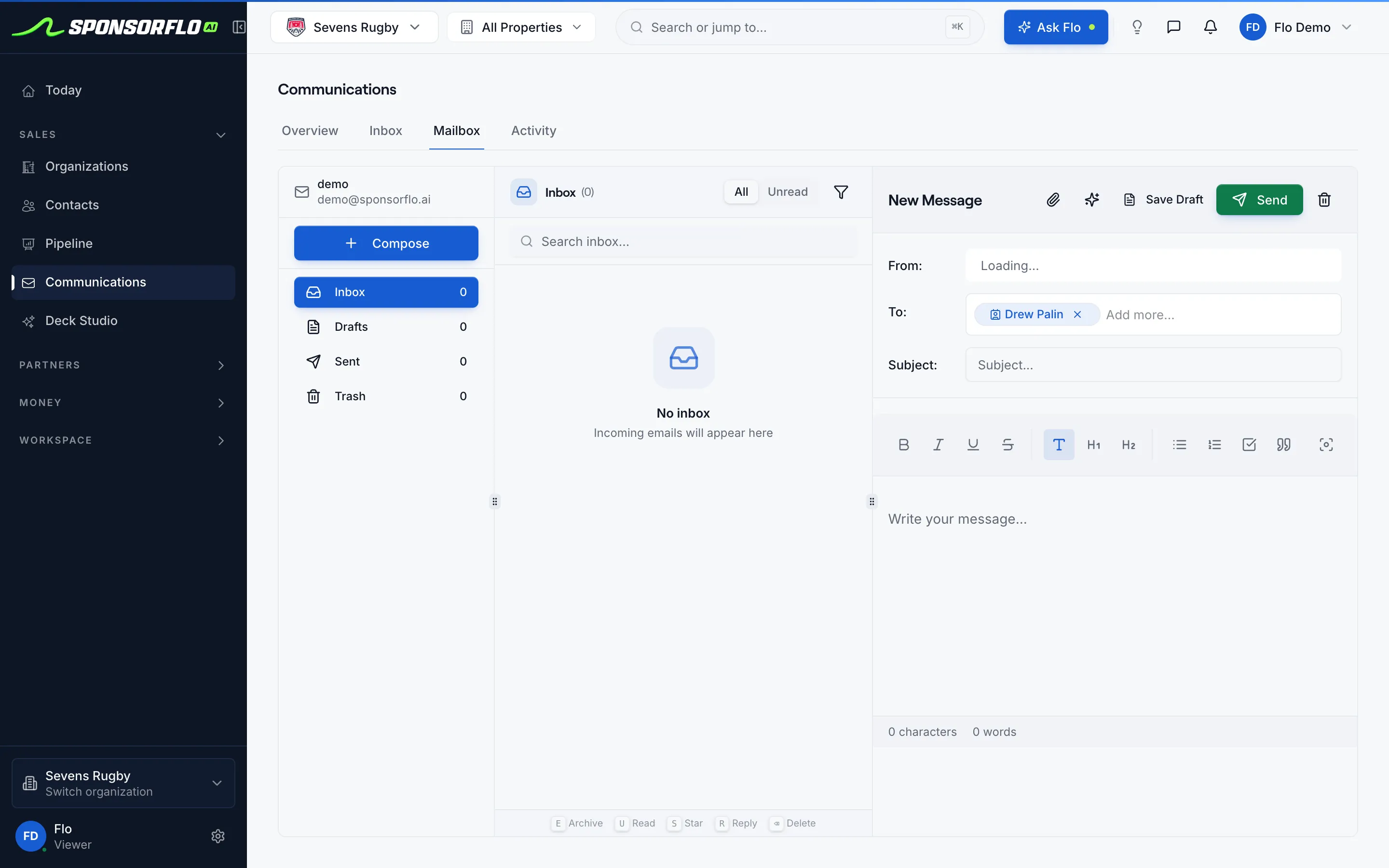
The draft pulls the contact, the deck you sent, whether they opened it, and the package on the table. You edit before anything sends from Gmail or Outlook.

app.sponsorflo.ai
SponsorFlo email compose screen for Sevens Rugby with the Gatorade contact in the To field and a draft editor ready to send from the connected inbox.
Compose: draft from the contact on the deal, send from your connected inbox.

Template pack or live compose?

Most teams start with the download, then switch once contacts and decks are in SponsorFlo.

Free template pack

You fill every field

  • Plain text for any email client
  • Cold, follow-up, cover, and close-the-loop
  • Works before you have a SponsorFlo account
  • Good for learning the voice
Compose in SponsorFlo

Drafted from the deal

  • Pulls the deck, opens, package, and last note
  • You edit; nothing sends on autopilot
  • Send from connected Gmail or Outlook
  • Replies thread on the contact
See AI emails

Filled examples for a real Sevens deck.

Use these when you are sending the live Gatorade × Sevens Rugby proposal — or swap the names for your own property.

Cover note for a live deck

Subject

Gatorade × Sevens — short deck when you have 3 minutes

Hi Avery,

I put together a short deck for a hydration partnership at Silicon Valley Sevens.

Worth a look when you have three minutes:
• Slide 4 — sideline cooler + jersey patch mockups
• Slide 6 — packages and pricing

Live deck: https://app.sponsorflo.ai/decks/f88d7c8d-da61-4b94-be80-230a40536b65

Open to 20 minutes next week to walk through inventory?

Jeff
Partnerships, Sevens Rugby

Follow-up after they opened it

Subject

Re: Gatorade × Sevens deck

Avery,

Looks like you opened the Sevens deck twice this week — thanks for taking a look.

Happy to jump on a quick call focused on the title vs presenting tiers, or I can send a revised package with the cooler activation only.

Which is more useful?

Jeff

Close the loop

Subject

Close the loop on Sevens?

Avery,

I haven’t heard back on the Sevens hydration package, so I’m guessing timing is off for this season.

If a smaller presenting tier is a better fit, I can send that. Otherwise I’ll close this out and check in before next year’s event calendar locks.

Either way works — just reply with a quick preference.

Jeff

Open the live Sevens deck these emails reference

Questions

Want the draft written from a real contact? Open live compose.

Can I use these sponsorship email templates without SponsorFlo?

Yes. Download the plain-text pack or copy any sample on this page into Gmail or Outlook. Replace the bracketed fields, keep cold emails under about 150 words, and send from your own address.

What is the difference between a template and an AI draft?

A template gives you structure. An AI draft in SponsorFlo fills in the deal: the contact, the deck you sent, whether they opened it, the package on the table, and your last note. You still edit before anything sends.

Should I attach the proposal PDF?

Prefer a tracked Deck Studio link. Attachments often get blocked, and you never know if the sponsor opened them. Point the cover email at the mockup and packages slides.

How many follow-ups should I send?

A first note, one follow-up with new information, and a close-the-loop if both go unanswered. Sponsors are partnership managers, not leads in a drip campaign.

Where can I see a real proposal to reference in the email?

Open the live Gatorade × Sevens Rugby deck from our Sevens Rugby demo workspace, then use a cover note that names the slides that matter.

Read the full sponsorship email template guide

How to write sponsorship emails that get replies

A sponsorship email is a short note that asks a brand for a meeting, permission to send a proposal, or a decision on a package. The best ones open with something specific about the brand, name one concrete asset, and end with a single next step. This page pairs copy-and-paste templates with a live compose surface from SponsorFlo so you can see how a deal-aware draft uses the deck you already sent.

Definition

Sponsorship email template

A reusable first draft for outreach, follow-up, proposal cover notes, and renewals. You replace bracketed fields with the sponsor’s name, your audience numbers, and one clear ask before you send from your own inbox.

What makes a sponsorship email work?

Keep cold outreach under about 150 words. Lead with a specific detail about the brand — a recent campaign, product launch, or retail push — then connect it to one asset you sell, such as a jersey patch, a booth, or a podcast read. End with one CTA: a 15-minute call, permission to send a deck, or a yes/no on a named package.

When should you use a template versus an AI draft?

Templates teach the structure and work in any email client. Once the contact, deck, and package live in SponsorFlo, an AI draft can fill in what a template cannot see: when you sent the proposal, whether they opened it, and the last note on the deal. Start with the free pack on this page, then open the live compose demo when you want the draft written from a real contact record.

How do you send a proposal without attaching a PDF?

Corporate inboxes often strip or deprioritize attachments. Send the deck as a tracked link from Deck Studio and use a short cover email that points to one or two slides — the mockup and the packages. You will see when they open it, which tells you when to follow up.
Never write “just checking in” again.

Download the templates, or open a live contact and see the draft SponsorFlo writes from the deal.

DeckList Sponsorship