

On this page
How does AI sponsorship management work?
AI sponsorship management automates the repetitive parts of selling and fulfilling sponsorships. Instead of building every proposal slide by hand, manually researching each prospect, and chasing proof of performance in spreadsheets, AI tools generate first drafts that you review and refine before sending.
The key difference from general-purpose AI writing tools is that sponsorship-specific platforms keep everything connected. Your proposal, mockups, emails, agreements, deliverables, and payments all live on the same sponsor record, so nothing gets lost between a shared drive and a messaging thread.
What can AI do across a sponsorship workflow?
AI helps you sell and fulfill sponsorships in six ways: building decks, researching sponsors, generating mockups, drafting emails, reading analytics, and suggesting activation ideas. Each capability works on the same sponsor record, so your proposal, emails, agreement, and proof of performance are always connected.
AI deck builder
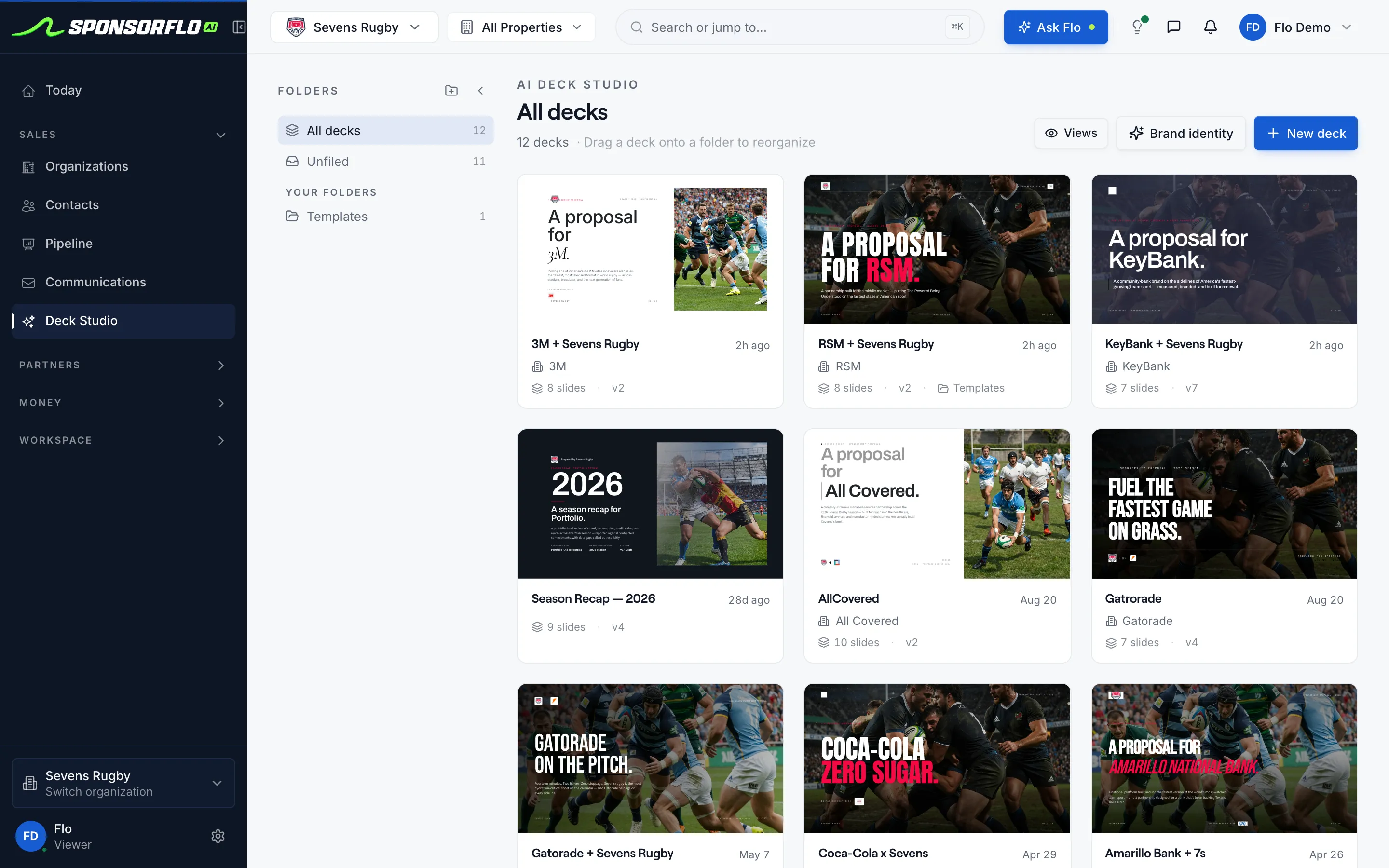
Deck Studio builds a branded sponsorship proposal from your inventory and the prospect's brand identity, including a cover slide, packages, pricing, and a logo mockup, typically in about 60 seconds. You edit every slide before sending.AI email drafting
Draft the first email, the follow-up, and the proposal cover note from the contact, the deck you sent, and the deal's history, then send it from your own Gmail or Outlook inbox.AI mockup generation
Place a sponsor's logo on your real jersey, scoreboard, or signage photo to show exactly how their brand will appear, with multiple placement options, then drop that image into your proposal without a separate design request.AI email drafting
Draft outreach, follow-up, and renewal emails on the contact record, then review and send from your connected Gmail or Outlook inbox so every message stays threaded with the deal.AI analytics and insights
See your pipeline value, conversion rate, average proposal value, and deal activity in one dashboard, with tabs for agreements, deliverables, partners, and video ROI.AI idea generation
Generate activation ideas grounded in the sponsor's brand and the inventory you actually sell, like a branded booth package or a podcast read, as starting points you refine before the pitch.
How does AI change each sponsorship task?
The same jobs, pitching, researching, mocking up, emailing, and proving fulfillment, take less manual effort when AI generates the first draft and everything stays on one record.
| Task | Before AI | With AI | What changes |
|---|---|---|---|
| Create a sponsorship proposal | Hours assembling slides, searching shared drives, and copying rate-card details by hand | A first-pass deck built from your inventory and the prospect in about 60 seconds | Edit, then send |
| Create activation mockups | Waiting days for a designer or agency to deliver a mockup | Sponsor logo placed on your actual asset photo in seconds | Drops into the deck |
| Write outreach emails | Starting from a blank draft for every contact | A tailored draft on the contact record, sent from your inbox | You still review and send |
| Track promised vs. delivered | Spreadsheets and messaging threads to chase down proof | Photo, link, or clip attached directly to each deliverable | Renewal built from proof |
How do you evaluate AI sponsorship tools?
The right AI sponsorship tool keeps proposals, emails, agreements, and proof on one sponsor record. Ask these questions when comparing options.
Sponsorship-specific features
- Does the proposal live on the same deal as the email and the agreement?
- Can you attach proof of performance to each contracted deliverable?
- Does your inventory, such as jersey patches, booth packages, and podcast reads, feed the pitch?
- Are irreversible actions like sending a proposal behind a confirmation step?
Output quality
- Can you edit every draft before it leaves your desk?
- Are mockups rendered on your real assets, not generic stock images?
- Does research cite verifiable sponsorship activity you can check?
- Do fields without data stay empty instead of inserting guesses?
Workflow and integrations
- Can teammates collaborate on the same sponsor and deal?
- Does the tool connect to Stripe or an invoicing system for payment collection?
- Is there a partner portal where sponsors can view deliverables and proof?
- Does the platform connect to your email inbox for threaded communication?
Security and data
- Is each workspace's data isolated with row-level security?
- Is sponsor data used to train shared AI models?
- Can you control data retention and exports?
- Does the vendor use OAuth for connected inbox and accounting integrations?
How do you implement AI in your sponsorship workflow?
You do not need to change everything at once. Start with the sponsorship task that takes the most time, such as proposals or sponsor research, and expand from there.
1. Pick your biggest time sink
For most teams, that is proposal creation or sponsor research. Focus on one workflow until you are comfortable with the output quality and your review process.2. Load your inventory and brand assets
Import your sellable assets, such as jersey patches, booth packages, podcast reads, and digital placements, with their categories, tiers, and pricing. Upload your logo and photos so the AI builds branded decks, not generic templates.3. Generate, review, and refine
Every AI output is a first draft. Review the deck slides for accuracy, check that mockup placements look right, adjust email tone, and confirm that any cited sponsorship activity is real before you send anything.4. Bring your team on board
Share the workflows that are working well and agree on a review checklist. When one person sends a polished deck that started as an AI draft, the rest of the team sees the value quickly.5. Expand to more workflows
Once your team is comfortable with proposals, add AI-drafted emails, agreement extraction, and deliverable tracking. Each new workflow connects to the same sponsor record, so there is no data to re-enter.
What does AI handle, and what stays human?
AI is best at drafting, organizing, and surfacing information. The relationship, the pricing decision, and the final approval stay with you.
What you can do with AI today
- Build branded decks with logo mockups from your inventory
- Research prospects and find decision-maker contacts
- Draft and send emails from your connected inbox
- Extract agreement terms and track deliverable proof
What stays human
- Relationship-building calls and negotiations
- Setting your rate-card pricing and package values
- Reviewing and correcting AI-extracted contract terms
- Approving sends, signatures, and invoices
How AI sponsorship management tools work — and how to choose one
AI sponsorship management refers to software that uses artificial intelligence to draft proposals, research prospects, generate activation mockups, write outreach emails, and extract agreement terms for teams, events, venues, and nonprofits that sell sponsorships. Instead of replacing the sponsorship professional, these tools produce first drafts on connected sponsor records so you spend less time on manual assembly and more time building relationships.
AI sponsorship management
AI sponsorship management is the use of artificial intelligence within sponsorship software to automate drafting tasks — proposals, mockups, emails, contract extraction, and analytics — while keeping every output on a single, connected sponsor record that the user reviews before sending.
What does AI actually do in a sponsorship workflow?
AI in a sponsorship workflow handles the time-consuming drafting and organizing tasks that previously required switching between slide software, image editors, email clients, and spreadsheets. At the proposal stage, AI reads your inventory of sellable assets — a jersey patch, a booth package, a podcast read, a digital display — and builds a branded deck tailored to a specific prospect. It can place the prospect's logo on your actual asset photos to create mockups, draft outreach and follow-up emails from context on the contact record, and extract terms and deliverables from an uploaded contract.
The critical distinction between sponsorship-specific AI and a general writing assistant is the connected record. In a purpose-built platform, the proposal, the mockup, the email thread, the agreement, the deliverable checklist, and the payment all live on the same sponsor record. When it is time to renew, you can pull up everything you promised, everything you delivered, and every communication in one place rather than searching shared drives and messaging threads.
What is the difference between AI sponsorship tools and a general CRM?
A general CRM tracks contacts, companies, and deal stages, but it does not understand sponsorship-specific objects like sellable inventory, activation mockups, proof of performance, or contracted deliverables. AI sponsorship management tools are built around these objects. For example, when you attach a photo or video clip as proof that a scoreboard ad ran during a game, that proof sits on the specific deliverable line tied to the agreement, not in a generic notes field. When the AI drafts a renewal proposal, it can reference what was actually delivered and proved, not just what was promised.
SponsorFlo works alongside your existing company CRM rather than replacing it. It can push your website leads to your HubSpot portal and connects to Gmail or Outlook for email threading, but its core value is the sponsorship-specific workflow: inventory to deck to agreement to deliverable to proof to renewal.
How does AI build a sponsorship proposal?
In SponsorFlo's Deck Studio, you select a prospect and the inventory items you want to pitch. The AI generates a branded deck that includes a cover slide, package details with pricing, and a logo mockup showing the sponsor's brand on your real asset photo — typically in about 60 seconds. Each deck is created specifically for that sponsor, and version history tracks every edit. When you are satisfied with the deck, you send it as a tracked link that reports when the sponsor opens and views it, so you know exactly when to follow up.
The AI does not invent audience numbers or fee totals. If a field in your inventory does not have data, it stays empty so you can fill in your own figures from your rate card. This matters because sponsorship pricing is relationship-dependent and market-specific — you need to set those numbers, not a language model.
How do AI-generated mockups work for sponsorships?
AI mockup generation takes the sponsor's logo and composites it onto your actual asset photos — your real jersey, your actual scoreboard, your venue signage — rather than placing it on generic stock images. This gives the prospect a realistic preview of how their brand will appear. You can generate multiple placement options and drop the best one directly into the proposal deck. Because the mockup is on your real photo, it carries more weight in a pitch meeting than an abstract description of placement.
How should you handle AI-drafted sponsorship emails?
AI-drafted emails are generated on the contact record using context from the deal — the prospect's industry, the inventory you are pitching, the stage of the conversation. You review and edit every draft before sending, and the email goes from your connected Gmail or Outlook inbox so it appears in your normal sent folder and replies thread back to the contact record. This means you maintain a complete communication history on the sponsor record without copy-pasting between tools.
The review step is essential. AI can produce a competent first draft, but the tone, the specific ask, and any reference to a prior conversation should reflect your actual relationship with that contact. Think of the AI draft as a starting point that saves you from staring at a blank compose window.
What happens after a sponsorship agreement is signed?
Once a sponsor signs, AI can extract the terms, fees, and deliverables from an uploaded PDF or Word contract and populate them on the agreement record. You review the extracted terms to make sure they match what was negotiated, then each deliverable becomes a trackable item with a status, due date, priority, and space for proof attachments — a photo of the jersey patch on game day, a link to a social media post, a video clip of the scoreboard ad, or a file with digital impression reports.
Overdue deliverables are flagged automatically, so you can address fulfillment gaps before they become a renewal problem. When it is time to renew, the complete record of what was promised, what was delivered, and the proof that backs it up is already organized on the partner record.
How do payments and invoicing connect to AI sponsorship management?
In SponsorFlo, invoice drafts are generated from signed agreements, and payment collection runs through Stripe Connect. For teams that use QuickBooks Online, a two-way sync keeps customers, invoices, and payments matched between systems, with webhook support and GL account, class, and tax-code mapping. This means your finance team does not need to re-enter sponsorship payment data into the accounting system manually.
What analytics do AI sponsorship tools provide?
SponsorFlo's analytics dashboard shows pipeline value, conversion rate, average proposal value, and activity metrics. Separate tabs break down agreements, deliverables, partners, and video ROI. The Video ROI feature analyzes a YouTube, Instagram, TikTok, or X URL (or an uploaded video file) to detect sponsor logos, estimate media value, and generate an effectiveness score you can include in a proof-of-performance report.
For brands that buy sponsorships, Brand HQ provides a portfolio view of every sponsored property with annual value, renewal timing, health indicators, and Performance and ROI metrics including impressions, reach, media value, total spend, cost per impression, and deliverable completion rates.
What security should you expect from AI sponsorship software?
At minimum, look for per-workspace data isolation so that one organization's sponsor data is never accessible to another. SponsorFlo uses row-level security to isolate each workspace's data and OAuth for connected inboxes and QuickBooks. Ask any vendor whether your sponsor data is used to train shared AI models, what their data retention and export policies are, and what encryption is in place for data in transit and at rest.
How do you get started with AI sponsorship management?
Start by importing your sellable inventory — your assets, categories, tiers, and pricing — either manually or via CSV import. Add a prospect, generate a first-pass deck, review and edit the slides, and send it as a tracked link, so you can send a real proposal the same day you start. From there, connect your Gmail or Outlook inbox for email threading, upload a signed agreement to extract deliverables, and begin attaching proof as you fulfill each commitment.
Flo, SponsorFlo's built-in AI assistant, can answer questions about your deals, partners, and agreements as you work, so you do not need to dig through records to find the information you need during a call or meeting.
- AI Deck Builder — Build a branded sponsorship deck from your inventory
- AI Mockups — Place sponsor logos on your real asset photos
- AI Analytics — Pipeline, deliverables, and video ROI dashboards
- AI Sponsorship Automation — Connected workflows from pitch to proof
Questions
- Will AI replace sponsorship sales professionals?
- No. AI handles drafting tasks like building decks, generating mockups, and writing follow-up emails so that sponsorship professionals can spend more time on relationship building, negotiation, and strategy. You always review and approve before anything is sent.
- How should I review AI-generated sponsorship content?
- Treat every AI output as a first draft. Check that slides reflect your current pricing, verify any cited sponsorship activity, confirm mockup placement looks accurate, and adjust the tone of emails before sending from your inbox.
- Is my sponsorship data safe with AI tools?
- Look for per-workspace data isolation, encryption in transit and at rest, OAuth for connected services, and a clear policy on whether your data trains shared models. In SponsorFlo, row-level security isolates each workspace's data, and connected inboxes and QuickBooks use OAuth.
- What results should I expect from AI sponsorship tools?
- Track your own metrics: how quickly you can produce a sendable deck, how often proof of performance is attached to deliverables, and how many renewals start from existing deal records. Results vary by team size, deal volume, and workflow.
- How long does it take to start using AI sponsorship tools?
- You can import your inventory, add a prospect, generate a first-pass deck, and edit it within your first session, so you can send a real proposal the same day you start.