

AI Deck Builder
AI sponsorship deck builder in 60 seconds.
SponsorFlo Deck Studio is an AI sponsorship deck builder for teams, events, and nonprofits that sell sponsorships. Pick the brand you are pitching. It builds a branded deck from the inventory you already sell, with packages, pricing, and their logo on your real asset, then tells you when they open it.
From prospect to sent deck in three steps.
Pick the sponsor
Choose the brand you are pitching. SponsorFlo pulls their logo and starts from your inventory and brand identity.
Get a first draft
Cover, audience, packages with deliverables, their logo on your asset photo, pricing, and a next step, assembled in about a minute.
Edit, then send a tracked link
Reorder and rewrite anything. Export to PDF, Google Slides, or PowerPoint, or send a link that shows you when it is opened.
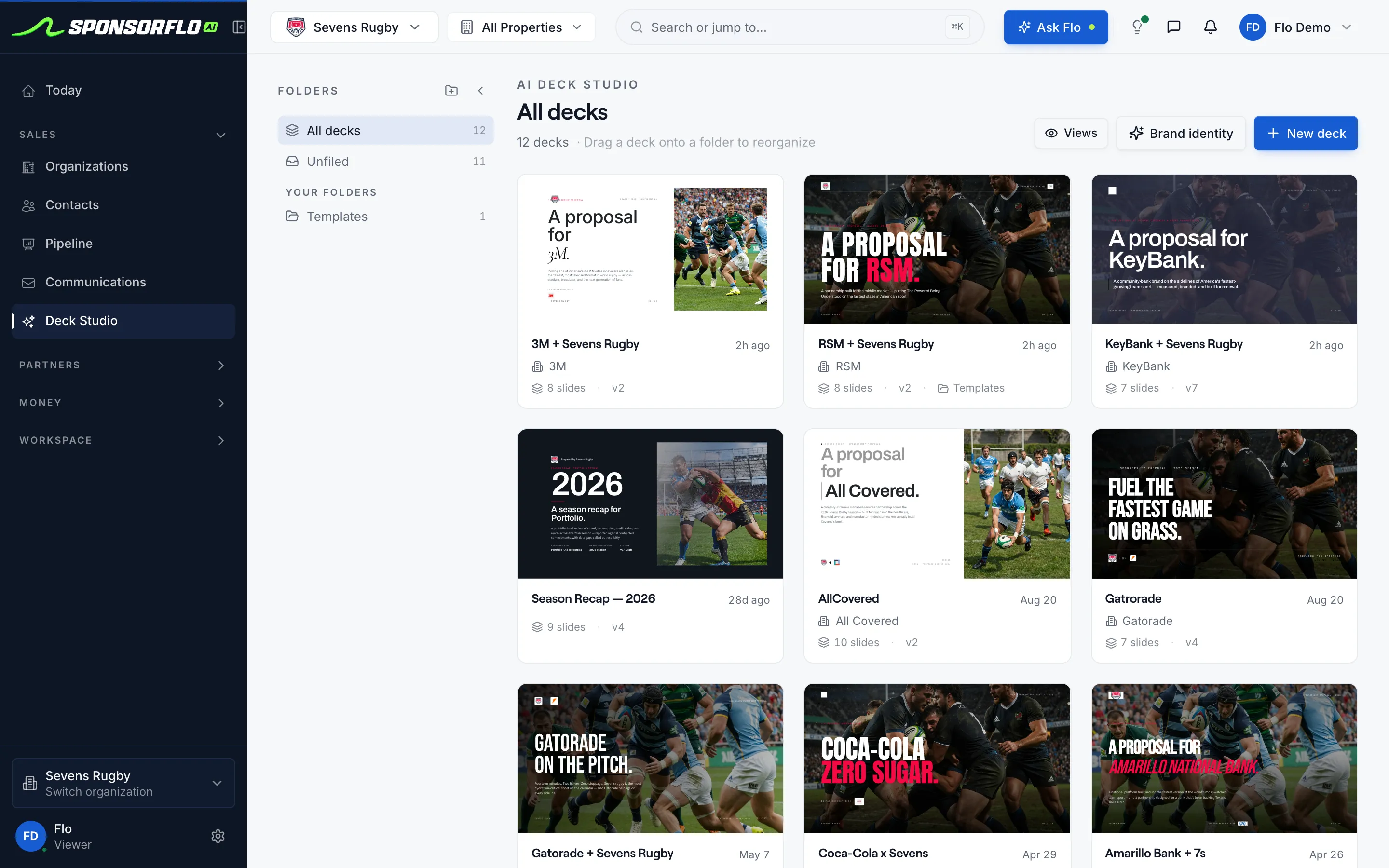
One deck per sponsor, all in one library.
Every deck carries the sponsor’s name and logo, keeps its version history, and shows views once it is sent.
Packages a buyer can actually approve.
Deck Studio turns vague exposure language into deliverables with quantities and pricing, so the sponsor can evaluate the deal without a call.
“Premium brand exposure across our matchday experience.”
A buyer cannot price this, approve it, or hold you to it.
- Front-of-shirt patch on home and away kits, full season
- LED board rotations at every home match
- Hospitality table at each home match
- Title partner credit on all match graphics
Know when they open it. Know what to do next.
Send the deck as a tracked link instead of a PDF. Every view is logged, and replies from Gmail or Outlook land right beside it.
Opened twice with no reply? That calls for a phone call or a revised package, not another check-in email.
Build your first deck- Deck sent as a tracked linkTo Dana Ruiz, Head of Brand Partnerships
- ViewedFirst view
- Viewed againSecond view
- No reply yet
Call Dana this week, or adjust the title tier and resend from the same thread.
In the product: Revise and resend · Log a call
The deck is where the partnership starts, not a file that gets lost.
- PitchBuilt from your inventory and brand
- OpenedViews and replies logged
- RevisedAdjust a tier and resend, history intact
- SignedDraft, redline, and e-sign the agreement
- DeliveredDeliverables tracked, sponsor invoiced
How it compares.
Different tools are built for different jobs. Here is where each one fits.
| SponsorFlo | Digideck | SponsorCX | |
|---|---|---|---|
| Built for | Building, sending, and closing the pitch | Interactive presenting from a governed slide library | Inventory, contracts, and fulfillment |
| Deck creation | Generated from your inventory, per sponsor | Assembled from Master Deck slides | Usually made in outside design tools |
| Logo mockups | Sponsor logo on your real asset photo | Designed separately | Designed separately |
| After the deck | Tracked views, agreement, and fulfillment together | CRM and contracts in other tools | Strong CRM and fulfillment |
| Best if | You need a branded deck today and want the follow-up in one place | Live presenting is the priority | A design team already handles your decks |
Questions
Still deciding? See pitch deck outlines by property type, or try the free sponsorship mockup generator on one of your own photos.
What is an AI sponsorship deck builder?
An AI sponsorship deck builder is software that assembles a branded pitch deck from your sponsorship inventory, brand identity, and a named prospect. SponsorFlo Deck Studio produces a cover, audience slide, packages with deliverables, a mockup of the sponsor logo on your asset photo, pricing, and a next step, then keeps the deck on the deal so you can track views and replies.
What does SponsorFlo Deck Studio include in each deck?
Each deck includes a branded cover with your mark and theirs, an about slide, an audience slide, packages listed as deliverables with quantities and pricing, a mockup slide showing the sponsor logo on your real asset photo, a price summary, and a next-step slide. Every deck carries version history and reports views once you send it as a tracked link.
How is Deck Studio different from Digideck / DIGIDECK?
Digideck (Sportsdigita) is a Master Deck presentation platform built around governed slides and interactive presenting. Deck Studio authors the pitch from your inventory on the deal record, and the proposal, CRM stage, and fulfillment all stay on that same deal. Choose Digideck if interactive presenting is the priority; choose SponsorFlo when you need the deck, the deal, and the follow-up in one workspace.
How is Deck Studio different from SponsorCX?
SponsorCX is a strong sponsorship CRM and fulfillment suite, but deck authoring typically stays in external design tools. SponsorFlo generates the deck with packages and a logo mockup inside the workspace on the prospect, and fulfillment runs on the same deal record. Stay on SponsorCX if branded decks are already handled by a design team you are happy with.
Can I export to PowerPoint or Google Slides?
Yes. After you edit, you can export to PDF, Google Slides, or PowerPoint. The original deck remains on the deal record and continues to track views and replies when sent as a tracked link.
Do I need a designer to use Deck Studio?
No. Deck Studio applies your logo, colors, and type to every slide automatically. If you have a designer, they can refine the exported file instead of starting from a blank template.
How does SponsorFlo track whether a sponsor opened my deck?
When you send a deck as a tracked link from the deal, SponsorFlo logs each view against that deal. Replies from your connected Gmail or Outlook inbox are threaded on the same contact, so you can see exactly who opened the proposal and whether they responded.
AI sponsorship deck builder
Software that uses AI to assemble a branded sponsorship pitch deck from your assets, packages, brand identity, and prospect data. The output is a sendable, trackable proposal on a deal record, not a generic slide theme or a detached design file.
Read the full AI sponsorship deck builder guide
AI sponsorship deck builder: how to build, send, and track a branded pitch deck
An AI sponsorship deck builder creates a branded pitch deck from your sponsorship inventory and a named prospect, so you can send a professional proposal without starting from a blank slide. SponsorFlo Deck Studio assembles a cover, audience slide, packages with deliverables, a mockup of the sponsor logo on your asset photo, pricing, and a next step, then sends the deck as a tracked link that reports views. The deck, the deal, and every follow-up stay in one workspace.
What does an AI sponsorship deck builder include in a pitch deck?
A complete sponsorship pitch deck should give the prospect everything they need to evaluate and approve the deal. SponsorFlo Deck Studio builds each of these sections automatically from the inventory and prospect you select, so you spend your time editing rather than assembling.
- Cover: your brand mark and the sponsor logo, the property name, and the prospect company.
- About: a short description of your property with attendance or audience reach.
- Audience: demographics or viewership figures you provide and can stand behind.
- Packages: deliverables listed with quantities, dates, and pricing for each tier.
- Mockup: the sponsor logo placed on a photo of the real asset you sell, such as a jersey patch, a stadium banner, or a booth backdrop.
- Price and next step: the total asking price and a clear action the prospect should take.
How does an AI sponsorship deck builder work?
You select a prospect from your pipeline, confirm the inventory lines and pricing, and the AI assembles the deck. In SponsorFlo, the process takes three steps: choose the deal, let Deck Studio build the first pass, then edit and send. The deck is created on the deal record, which means the proposal, CRM stage, agreement, and deliverables all live in the same place.
- Open the deal for the company you want to pitch.
- Confirm the inventory lines, audience figures, and package pricing you want to include.
- Deck Studio assembles the cover, about, audience, packages, mockup, price, and next step.
- Edit slides: adjust tone, reorder sections, add a custom page, or replace any content.
- Send the deck as a tracked link from the deal so views and replies are logged automatically.
How do you know if a sponsor opened your deck?
Send the deck as a tracked link instead of a PDF attachment. When you send a deck from SponsorFlo, each view is logged against the deal, and replies from your connected Gmail or Outlook inbox appear in the same thread. A sponsor who opened the deck twice but has not replied usually needs a phone call or a revised package, not another generic check-in email. A sponsor who never opened it may need a different contact or a new subject line.
When should you use an AI sponsorship deck builder?
Any time you need a branded proposal faster than a designer can build one. The common situations where Deck Studio saves the most effort are pitches with a short deadline, seasonal package rollouts, and organizations that do not have a dedicated design team.
- A title sponsorship pitch where the prospect expects a proposal this week: you have the asset photo and a named account, and the deck should exist today.
- A full season of tiered packages you already sell, rewritten from vague exposure language into clear deliverables a buyer can evaluate.
- A nonprofit, event, or association without a designer on staff that needs a branded, professional-looking deck.
- A follow-up pitch after the prospect opened the first send: adjust the package and resend from the same deal so the history stays intact.
What happens after the AI builds the first pass?
The first pass is a starting point, not a finished send. Review every slide, adjust tone and wording, reorder sections, and add any custom pages your prospect or legal team requires. You can export the deck to PDF, Google Slides, or PowerPoint so a designer can refine it in their own tool. The original deck remains on the deal record, and when you send it as a tracked link, view counts and email replies land on the same deal.
How is Deck Studio different from Digideck and SponsorCX?
Digideck (DIGIDECK / Sportsdigita) is a Master Deck presentation platform built around governed slides, a slide library, and interactive presenting. The product is designed for the meeting itself, and CRM, contracts, and fulfillment usually live in separate tools. SponsorCX is a strong sponsorship CRM and fulfillment suite, but the branded deck and logo mockup typically stay in external design software. Deck Studio authors packages and mockups from your inventory on the deal record, so the deck, the CRM stage, and fulfillment are not spread across three tools.
- Digideck: Master Deck library and interactive presenting; choose it if presenting culture is the priority.
- SponsorCX: CRM depth with inventory, contracts, and fulfillment; choose it if decks are already a design-team job you are happy with.
- SponsorFlo: the deck, the deal, the agreement, and the deliverables live in one workspace with tracked sending.
Who is an AI sponsorship deck builder for?
Partnership directors, nonprofit development leads, event producers, and agency sellers who know what they sell but need a branded proposal today. If you have inventory photos, package tiers, and a named prospect, Deck Studio builds the deck so you can focus on the conversation instead of the formatting.
- Teams and venues rebuilding a rate card from last season and need to send proposals now.
- Charities and associations sending a title sponsorship ask before gala season.
- Podcast and YouTube hosts packaging reads, integrations, and mid-roll spots for the first time.
- Agency sellers who need a client-ready deck without opening a second design tool.
Using Deck Studio for renewals and revised packages
When renewal season opens, last year's deck and agreement are still on the deal record. Build this year's pitch from updated inventory instead of copying a sent folder. If you offer three tiers, each line should name deliverables a fulfillment owner can act on, such as board nights, social post counts, or hospitality seats, so the mockup slide matches the tier the buyer selects. After you resend, tracked link analytics on the same deal show whether the sponsor opened the revision before you call.
- Title tier: a logo mockup on the primary asset photo plus hospitality deliverables you can allot.
- Presenting tier: fewer placements with the same branded design on every slide.
- Add-on lines: digital mentions or program placements priced separately without cluttering the hero mockup.
- Custom slide: exclusivity terms, community language, or legal requirements you add after the first pass.
- AI mockups — place a sponsor logo on your real asset photo for any pitch deck
- Sponsorship pitch deck templates — downloadable outlines organized by property type
Related features and resources
How deck generation works
A sample brief, the generated deck outline, and what to edit
Learn moreFeatureAI mockups
Place a sponsor logo on your real asset photo for any pitch deck
Learn moreResourceSponsorship mockup generator
Free tool: put a sponsor logo on your own asset photo and download a PNG
Learn moreResourceSponsorFlo vs SponsorCX
Compare deck building, CRM, and fulfillment side by side
Learn moreResourceSponsorFlo vs Digideck
Workspace-based decks versus Master Deck presentations
Learn moreResourceSponsorship pitch deck templates
Downloadable outlines organized by property type
Learn moreYour next sponsor pitch can go out today.
Build a branded deck from what you already sell, send it as a tracked link, and follow up when they open it.