
Digital sponsorship analytics: which metrics to track, how to tag campaigns, and how to report results sponsors trust
Digital sponsorship analytics is how you prove what a sponsorship actually delivered, using numbers you can export, verify, and defend in a renewal conversation. For a team, event, or nonprofit that sells sponsorships, that means choosing the right metric for each activation, tagging campaigns before they run, and attaching proof of performance to every deliverable. SponsorFlo keeps the metric, the proof, and the recap on the same record as the deal, so reporting is built into the workflow instead of bolted on at the end of the season.
What is digital sponsorship analytics?
Digital sponsorship analytics is the practice of measuring what each digital sponsorship activation delivered and reporting those results with evidence. Unlike traditional sponsorship measurement, which often relies on estimated attendance or media equivalencies, digital analytics draws on numbers the platform already reports: downloads from a podcast host, clicks from a UTM-tagged link, impressions from a social post, or logo detections from a video analysis tool. The goal is a number the sponsor can check independently, not an estimate you have to explain away.
Which metrics should you track for a digital sponsorship?
Track the metric each platform already reports, and make sure you can export it. The right metric depends on the activation type, but the test is always the same: can you show the sponsor where the number came from?
- Podcast or live stream: downloads or unique listeners from your hosting dashboard, such as Spotify for Podcasters or Apple Podcasts Connect.
- Newsletter or website: clicks on a UTM-tagged link tied to the sponsor flight, pulled from Google Analytics or your email platform.
- Social media: a dated screenshot of the post analytics showing impressions, engagements, and reach, exported from the platform itself.
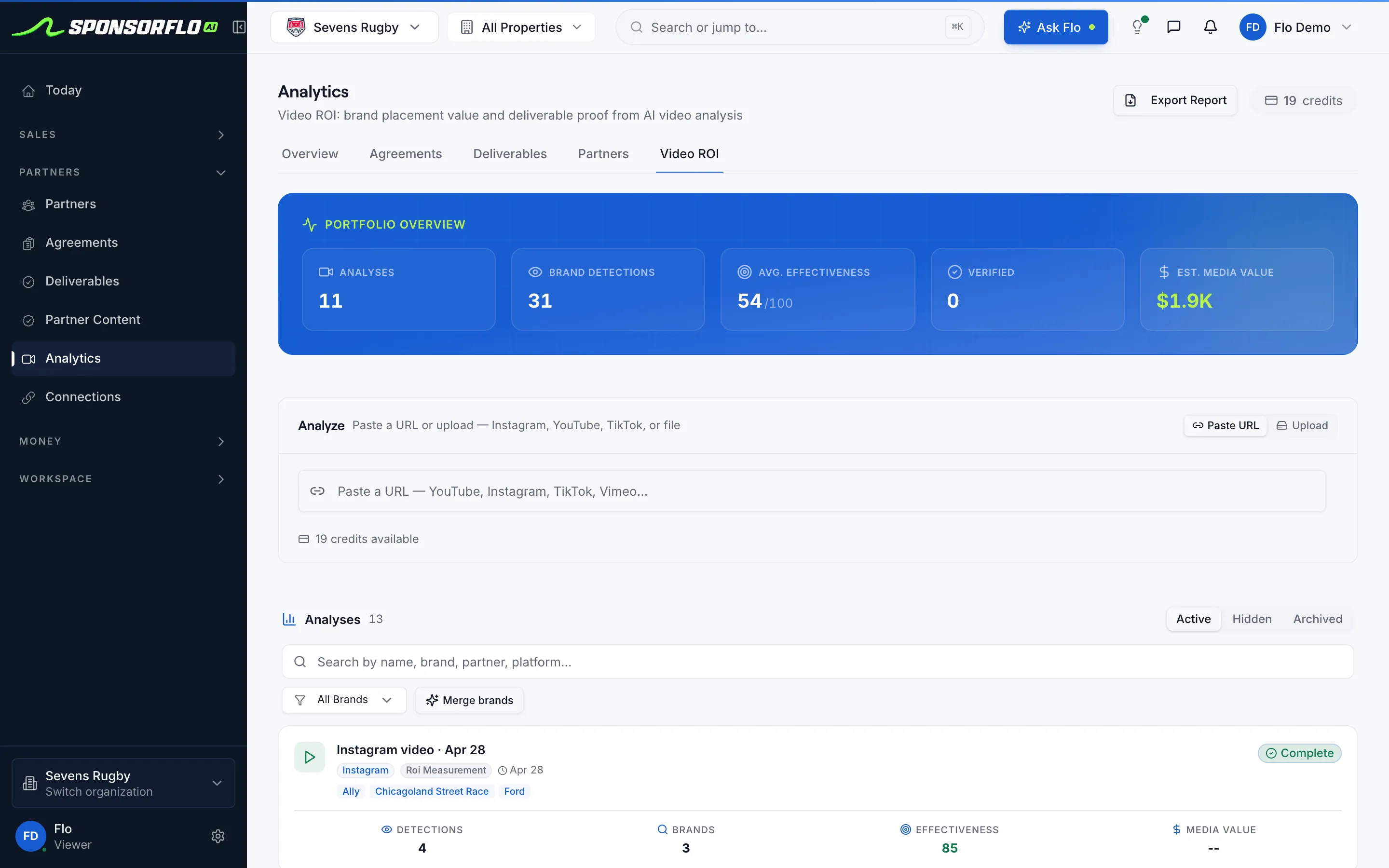
- Video: logo detection results from SponsorFlo’s Video ROI feature, which analyzes a YouTube, Instagram, TikTok, or X URL and estimates media value from the sponsor exposure it finds.
- On-site activation: gate scans, QR code scans, or promo code redemptions, depending on how the activation was designed.
A jersey patch sponsor at a minor league baseball game, for example, might receive a social post, a video highlight, and a newsletter mention as part of their package. Each deliverable gets its own metric: post impressions, logo exposure seconds and estimated media value, and tagged link clicks. All three numbers go on the deliverable in SponsorFlo with the proof attached.
How do you tag a sponsorship campaign for tracking?
Create a unique URL or UTM parameter for each sponsor flight before the campaign goes live. The tag lets you isolate that deal in your analytics platform so you can tell this quarter from last quarter when it is time to report. Without a tag, the data is there but it is mixed in with everything else, and separating it after the fact is often impossible.
A practical approach is to build one tagged link per sponsor per activation. If a booth package sponsor gets three newsletter mentions over the season, each mention gets its own UTM so you can show performance by flight. Store the tagged URLs alongside the deliverables in SponsorFlo so your team uses the right link every time and you do not lose track of what was tagged.
How to build proof of performance into your workflow
Proof of performance is what turns a number on a slide into a number the sponsor believes. The best time to collect it is when the deliverable runs, not the week before renewal. In SponsorFlo, each deliverable has fields for status, delivered impressions, and proof attachments including photos, links, files, and clips. When your team marks a social post as delivered, they attach the screenshot at the same time. When a podcast episode goes live, they log the download count and link to the hosting dashboard export.
This workflow means the recap report assembles itself from data that is already on the deal. You do not have to chase down screenshots from three months ago or reconstruct numbers from memory. A local music festival, for instance, can hand each sponsor a deliverable summary showing every promised benefit, the date it ran, the metric it delivered, and the proof, all pulled from SponsorFlo without opening a spreadsheet.
How do you measure sponsor logo exposure in video?
SponsorFlo’s Video ROI feature analyzes a YouTube, Instagram, TikTok, or X URL, or an uploaded video file, and detects sponsor logos in the footage. It reports brand detections, an effectiveness score, and estimated media value. You can export the report and share it with the sponsor as proof of the exposure their logo received during game footage, highlight reels, or social clips.
This is especially useful for sponsorships that include signage, LED boards, or branded apparel, where the value is visible in video but hard to quantify without a detection tool. Instead of telling a sponsor their logo appeared during the broadcast, you show them exactly how many times it was detected and what that exposure is estimated to be worth.
What should you leave off the recap?
Leave off any number you cannot back up with an export or a screenshot. Specifically, avoid reporting vanity engagement rates without the platform data behind them, impression totals built by multiplying attendance by an estimated views-per-person figure, and media equivalency values as the only metric when you have direct response data available. Sponsors trust recaps that show fewer numbers with clear sources more than recaps packed with estimates.
If a deliverable did not perform as expected, say so and explain what you will adjust next season. A sponsor who sees honest reporting is more likely to renew than one who suspects the numbers were inflated.
How to compare digital sponsorship performance across seasons
Compare flights year over year only when your tracking methodology stayed consistent. If you changed your UTM scheme, switched analytics platforms, or started using a new podcast host mid-season, the comparison breaks and the sponsor will notice. SponsorFlo keeps delivered impressions and proof on every deliverable historically, so you can pull data from previous seasons as long as the underlying metric was measured the same way.
When presenting multi-season data, call out any methodology changes explicitly. A sponsor who sees that clicks doubled is impressed; a sponsor who learns you also changed how you counted clicks is skeptical. Consistency in measurement is as important as the numbers themselves.
Putting digital sponsorship analytics into practice
Start with your next deal. Before the first activation runs, list every deliverable the contract promises, assign a metric to each one, create the tagged links, and set up the deliverables in SponsorFlo with due dates. As each activation runs, log the result and attach the proof. By the time the recap is due, the report is already built from verified data, and the renewal conversation starts with evidence instead of memory.
- Video ROI analysis — measure sponsor logo exposure in game footage and social clips
- Sponsorship recap report template — a structure for comparing what you promised with what you delivered