
See it work: contract term extraction
How SponsorFlo extracts terms from a sponsorship contract.
SponsorFlo reads a signed sponsorship agreement and pulls out the term, fee, payment schedule, deliverables, exclusivity, and renewal terms. Below is a fictional contract, the fields SponsorFlo returns for it, and where to check its work before the season starts.
The demo workspace is read-only and needs no signup.
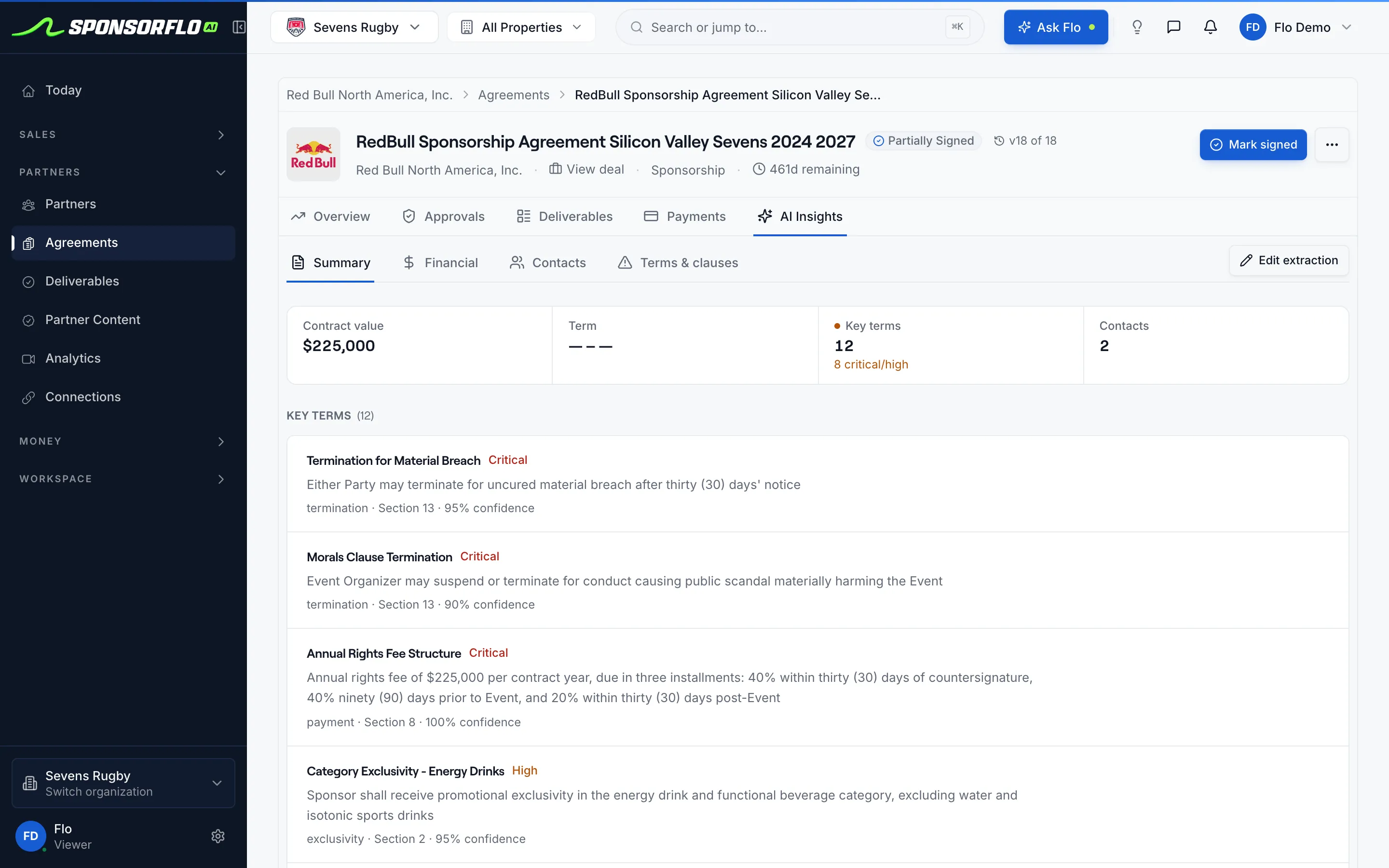
Screens are from Sevens Rugby, our read-only demo workspace.
A sample contract, and what SponsorFlo returns.
A minor league hockey club signs a credit union for three seasons. Each highlighted clause on the left becomes a field on the right.
Section 2. TermThis Agreement begins on September 1, 2026 and ends on August 31, 2029, covering three hockey seasons.
Section 4. Sponsorship feeSponsor shall pay Club $90,000 per season, in three installments of $30,000 due October 1, January 1, and March 1.
Section 5. Sponsor benefitsClub shall provide two (2) dasher board panels at all home games; six (6) sponsored social posts per season; four (4) season tickets; and presenting rights to four (4) Northgate Kids Skate nights.
Section 7. ExclusivitySponsor is Club's exclusive financial institution partner, covering banks and credit unions, for the Term.
Section 9. RenewalSponsor may renew for one additional season by written notice at least 90 days before the Term ends.
Field labels are the ones in the agreement's AI Insights tab: Contract duration, Payment Terms with its Payment Schedule, Deliverables, and Key terms ranked by importance. The contract, the club, and the credit union are fictional.
Three steps from PDF to a season of work.
Upload the contract
Click New agreement and drop a PDF or Word file. SponsorFlo reads it while you wait. Digital PDFs read cleanest, and scanned PDFs go through text recognition first.
Review what it found
Before anything is created, SponsorFlo shows the sponsor it read from the contract and how many deliverables it found. You confirm the company, keep or change the title, and pick the deal the contract closes.
Check each line on the draft
Create agreement opens a draft with the deliverables, payment schedule, and key terms. Correct a key term in AI Insights with Edit extraction, and a deliverable or installment on its own tab.
Watch agreements in the walkthrough
A two-minute tour of the Sevens Rugby demo workspace. Agreements and deliverables appear about 1:23 in.
What it does well, and where to check it.
Extraction saves the retyping. A partnership manager still reads the contract once, and these are the places to look.
What it does well
- Dates and money from proseTerm dates, fee, and each installment come out of the paragraph they were written in.
- Benefits separated from termsSponsor benefits become deliverables with quantities, while exclusivity and approval rights stay as contract terms.
- Exact wording keptEach deliverable keeps the contract language it came from, so ops can check it against the PDF.
- Key terms rankedExclusivity, renewal, and termination are ranked by importance with the section they came from.
Where to check its work
- Due dates and posting rhythmQuantities and categories come through. Set due dates and how often a post or sign runs on the Deliverables tab.
- Option yearsRenewal options arrive as text under Renewal and Key terms, not as a separate field you can report on.
- Long scanned PDFsText recognition can come back incomplete on long scans, so check the last sections and any exhibits.
- Edits after creationCorrecting AI Insights does not change deliverables already created. Edit those on the Deliverables tab.
Questions
How does SponsorFlo extract terms from a sponsorship contract?
SponsorFlo reads the uploaded agreement with AI and returns five groups of fields: contract duration, payment terms with an installment schedule, deliverables with quantities, contacts for both sides, and key terms such as exclusivity, renewal, and termination ranked by importance. The agreement is created with those deliverables and payments, and you review and correct the fields in its AI Insights tab.
Which files work best?
Digital PDFs and Word files give the cleanest results. Scanned PDFs are converted with text recognition before extraction, so check long scans closely. PDFs up to 10 MB are read; split a larger file or upload the Word version.
Do I approve the deliverables before they become work?
You confirm the sponsor company, the agreement title, and the deal before SponsorFlo creates the agreement. The deliverables then land as pending items, so assign owners and due dates on the Deliverables tab as part of your review. Changing a field in AI Insights updates the extraction, while deliverables already created are edited on the Deliverables tab.
Can brands upload contracts too?
Yes. In Brand HQ, a brand uploads a property contract and sees the analysis before attaching it: property, dates, contract value, payment terms, deliverables, rights, and exclusivity. It only fills fields that are empty, so nothing you typed is overwritten.
Related
Open an extracted agreement.
The demo workspace has signed agreements already extracted into deliverables, payments, and key terms. It is read-only and needs no signup.